
Do you want AI to become an assistant in content creation, data organization and workflow testing? Google AI Studio is an AI experimental platform provided by Google to developers and advanced users. It can test Gemini models, create prompts, process text, pictures, audio files, and videos, and extend the tested prototypes to Gemini API or actual product processes.
If you can’t tell the difference between Google AI Studio, Gemini App, Vertex AI, NotebookLM or Google Antigravity, this article will be organized in a more vernacular way. We will also add how we use AI Studio when actually doing SEO content: such as organizing verbatim drafts, producing FAQs, testing AI search questions, and turning audio and video materials into content that can be searched and cited.
ORCABIZ CONSULTANT NOTE
Orca consultant reminds: Google AI Studio is very suitable for testing prompts, organizing verbatim drafts, and making content drafts, but before it is officially launched, you still need to go back to search intent, brand tone, data sources, and manual review.
💡 Information updated: May 27, 2026. Google AI tools are updated very quickly. This article will be organized based on official documents and practical usage scenarios. The model name and quota are still subject to Google’s official page.
Google AI Studio quick highlights
- What is Google AI Studio: The Gemini model testing and prototype development platform provided by Google is suitable for testing prompts, uploading files, testing API applications and organizing content materials.
- Who it’s best for: SEO editors, content creators, marketers, product managers, developers, and teams who need to organize verbatim drafts, audio-visual summaries, or content architecture.
- What can be done: Verbatim drafts, meeting summaries, video highlights, blog structure, FAQ drafts, prompt tests, multi-modal content organization.
- Relationship with AI SEO/GEO:AI Studio can help the content be clearer and more structured, but it still needs to be paired with search intent, Schema, E-E-A-T, internal links and manual review.
- Usage reminder: Do not directly upload customer personal information, medical information, contracts, account secrets or undisclosed internal information. Sensitive content must be classified first.
What is Google AI Studio?
Google AI Studio is the AI testing and prototyping platform in the Google AI for Developers ecosystem. You can think of it as a “Gemini Model Laboratory”: You don’t need to write a complete program first, but you can also use prompt to test the model’s understanding, output format, tone, and file processing capabilities, and then decide whether to connect to the API or make it a formal process.
Compared with general chat-based AI tools, the focus of AI Studio is not on a single conversation, but on allowing you to repeatedly test, adjust, and save prompts, and observe the differences between different Gemini models on the same task. This is useful for content creators, SEO editors, marketers, product managers, and novice developers.
In the 2026 I/O developer update, Google will also put AI Studio into a more complete development process, including Gemini API, Google Antigravity, AI Studio mobile development capabilities, Workspace and NotebookLM related integrations. In other words, AI Studio is not just a tool for “playing with AI”, but one of the entrances to Google’s AI workflow.
What are the noteworthy new directions of Google AI Studio in 2026?
If you only thought of AI Studio as a “webpage used to test prompts” before, you can now understand it again. Google’s direction in recent years is clear: AI Studio is responsible for allowing users to quickly try out ideas, Gemini API is responsible for allowing developers to connect capabilities to products, and Vertex AI handles more complete enterprise-level deployment.
- Gemini API and model updates:AI Studio can be used to test Gemini models and then bring feasible prompts or application logic to the API.
- Multi-modal input is more important: Text, pictures, audio files, and videos can all become content materials. For SEO editors, this means that interviews, lectures, podcasts, and course videos can be compiled into article materials faster.
- Closer to the development process: The division between Google Antigravity, AI Studio prototypes, Gemini API, and Vertex AI will become increasingly clear.
- The demand for AI search content has increased:AI Overviews, AI Mode, Gemini, and ChatGPT Search allow content to not only rank, but also be understood, organized, and cited by AI.
This is why we put Google AI Studio into the list of AI SEO/GEO tools. It won’t automatically do SEO for you, but it can speed up the process of organizing raw materials into clear content.
How to start using Google AI Studio? Edit actual test teaching
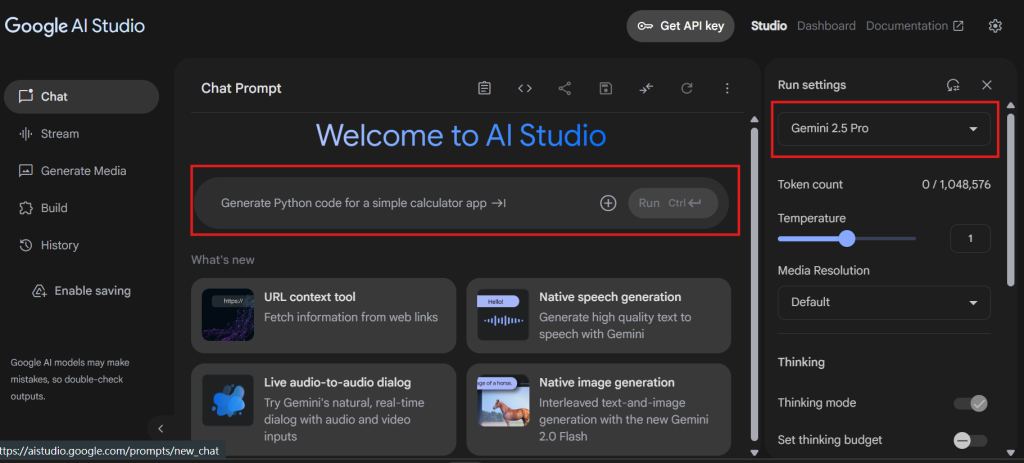
It is not difficult to use Google AI Studio. As long as you have a Google account, you can log in to the official website. When operating for the first time, you can start in Chat mode without rushing to study the API or develop settings.
1. Log in to Google AI Studio
Go to Google AI Studio official website and log in with your Google account. After logging in, you will see an operation interface where you can enter prompts, select models, and upload files.
2. Create a new Prompt test
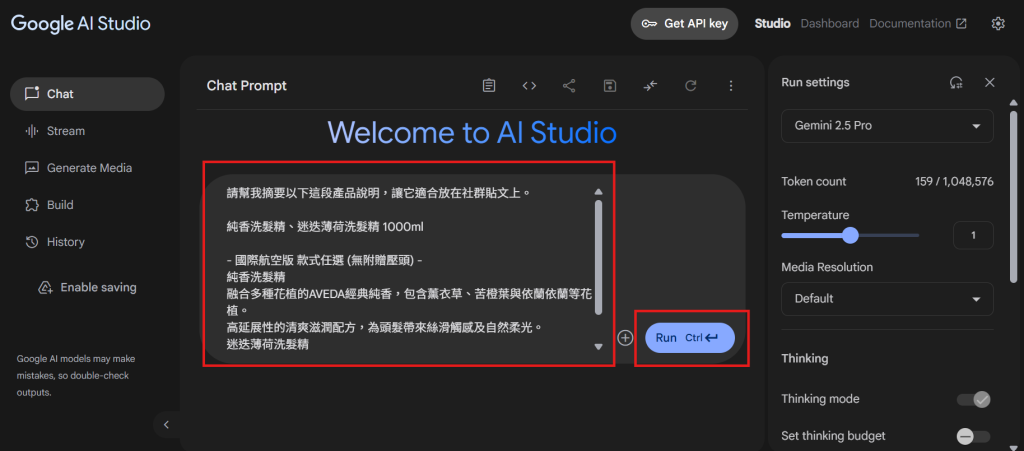
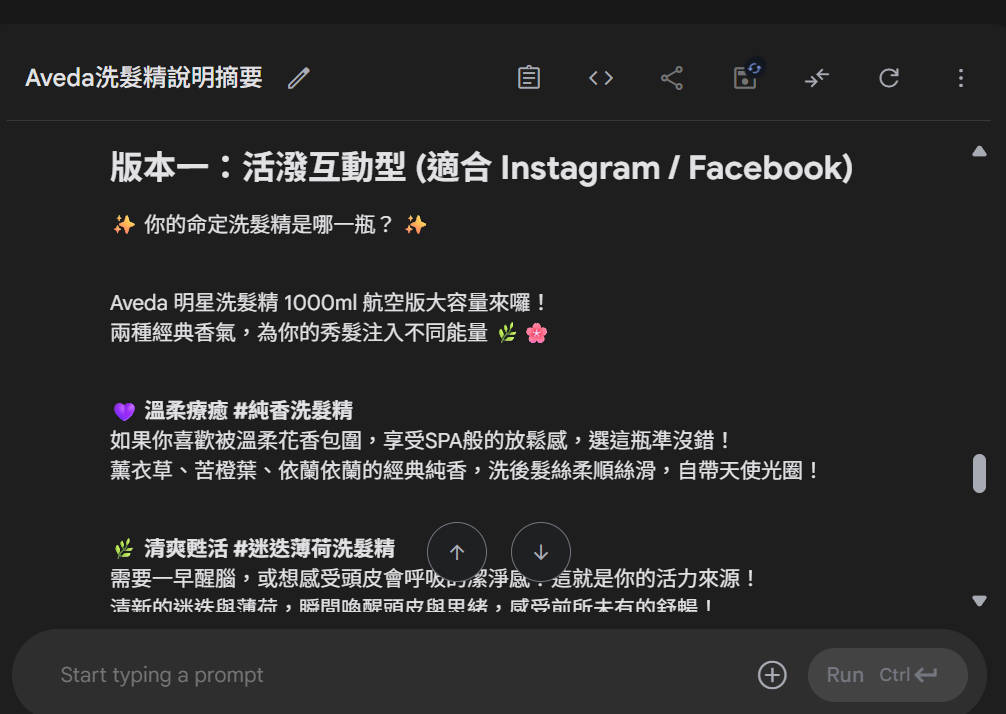
After clicking Chat or creating a new test project, you can enter commands directly. It is recommended not to just enter “Write an article for me” at the beginning, but to clearly explain the requirements, such as purpose, audience, tone, paragraph format and output restrictions.
Example prompt: “Please help me summarize the following product description and organize it into 3 key points. The tone should be suitable for social posts and avoid excessive exaggeration.” This kind of instruction will be easier to get usable results than simply saying “Help me summarize”.
3. Select model and input format
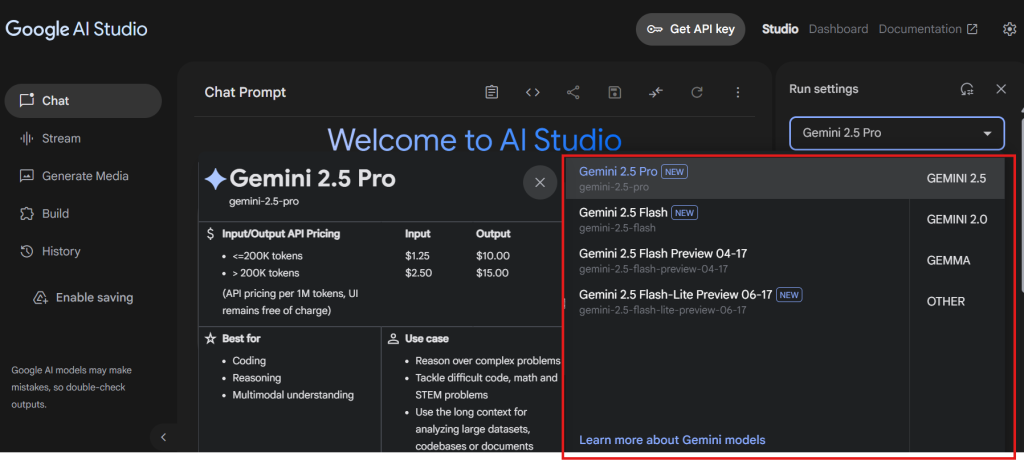
AI Studio will provide different Gemini models based on platform support status. Depending on the task, you can choose a model that favors high-quality reasoning, fast response, or is suitable for program development. Because the model name and available quota will be updated, it is recommended to refer to the AI Studio interface and official documents for actual use.
| Task type | Recommended test direction | Suitable for purpose |
|---|---|---|
| Long abstract | Choose the Gemini model with strong understanding | Meeting minutes, interview verbatim transcripts, lecture highlights |
| A large amount of data sorting | Prioritize testing response speed and format stability | Table sorting, data grouping, preliminary research |
| Content draft | Require output of paragraphs, titles, FAQ and citation fields | Blog draft, service page structure, social posts |
| Program or API testing | With official quickstart and API documentation | Prototype development, tool connection, automated process |
| Audio and video content processing | After uploading audio files, videos or transcripts, it is required to focus on sorting | Podcast, YouTube, and course video reuse |
If you are a Traditional Chinese user, you can enter directly in Chinese. What is more important is that prompt should be made clear, rather than forcing it to be changed to English. In actual testing, when you clearly explain the roles, tasks, formats, and restrictions, the Chinese output can also have good stability.
Recommended reading:Want to learn how to design effective prompts? Learn how to sing with AI and write effective instructions to improve the quality of dialogue
What are the differences between Google AI Studio, Gemini, Vertex AI, and NotebookLM?
Many people will get stuck here: They are all Google AI tools, which one should they use? Simply put, Gemini App is suitable for daily use, Google AI Studio is suitable for testing prompts and prototypes, Vertex AI is suitable for formal enterprise deployment, NotebookLM is suitable for organizing files and knowledge bases, and Google Antigravity is more biased towards AI development workflow.
| Tool | Suitable object | Main purpose | Suitable for SEO/AI SEO purpose | When to use it? |
|---|---|---|---|---|
| Google AI Studio | Developers, SEO editors, content creators, advanced users | Test prompts, cut models, upload files, create API prototypes | Organize verbatim drafts, FAQs, video summaries, article structures, and AI search question tests | Want to test whether AI can complete a certain content or process task |
| Gemini App | General users | Daily Q&A, writing, data organization, personal assistant | Quickly collect ideas, organize preliminary keywords and content direction | Want to quickly chat, ask questions, write letters or organize information |
| Vertex AI | Enterprise, engineering and data team | Model deployment, governance, enterprise-level AI development | Enterprise-level content system, internal data management, AI application officially launched | Requires formal launch, control authority, management model and data |
| NotebookLM | Research, education, content organizer | Organize abstracts, Q&A and notes based on uploaded files | Organize white papers, research reports, expert materials, strengthen E-E-A-T and source context | The data source is fixed, and you want AI to answer based on the files |
| Google Antigravity | Developers | AI-assisted development, agency development process | Develop SEO tools, content automation processes, technical SEO checking tools | Want to put AI into process development and multi-step workflow |
If you just want to ask questions, Gemini App will be more intuitive; if you want to repeatedly test prompts, upload audio and video files, and test the format of AI output, Google AI Studio will be more suitable.
Google AI Studio practical application: not only for writing manuscripts, but also suitable for organizing materials
The most practical aspect of Google AI Studio is to organize materials originally scattered in recordings, videos, documents, and pictures into content that can be read by humans and easily understood by search engines. Here are the scenarios we feel are best for marketing and SEO teams to use.
1. Upload audio files and automatically generate verbatim transcripts and abstracts
When there are interview recordings, conference audio files, customer consultations or course recordings, you can first use AI Studio to convert them into key summaries, and then hand them over to the editor to organize them into articles, FAQs or service page content.
- Click “Add file” to upload the audio file.
- Describe the output format in the prompt, such as “Please organize it into three areas: verbatim draft, meeting highlights, and to-do items.”
- If you want to convert it into SEO content, you can ask AI to additionally organize “questions that users may search for.”
2. Automatically generate summary or key notes from the video
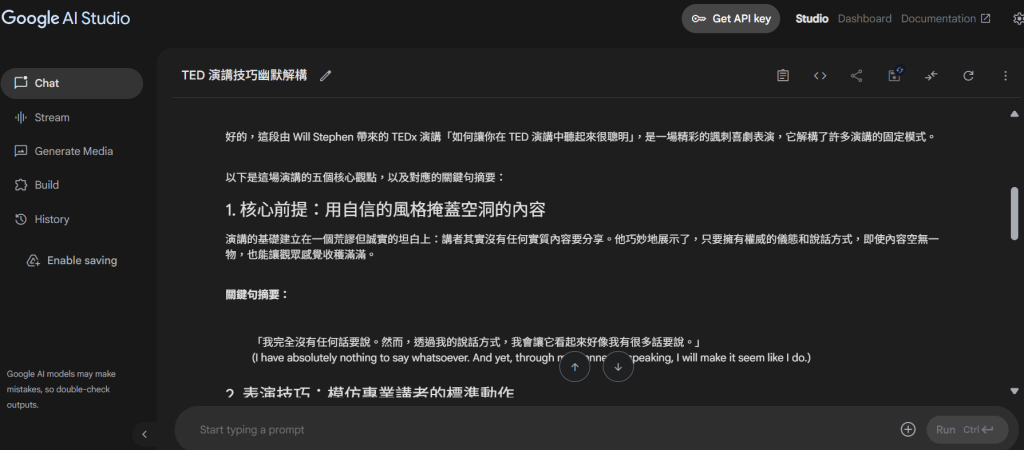
Lectures, YouTube, course videos and product demonstration videos are all suitable for breaking into article materials. You can ask AI Studio to organize the key points of the video, timeline, FAQ, and community articles, and then the editor will add the brand point of view.
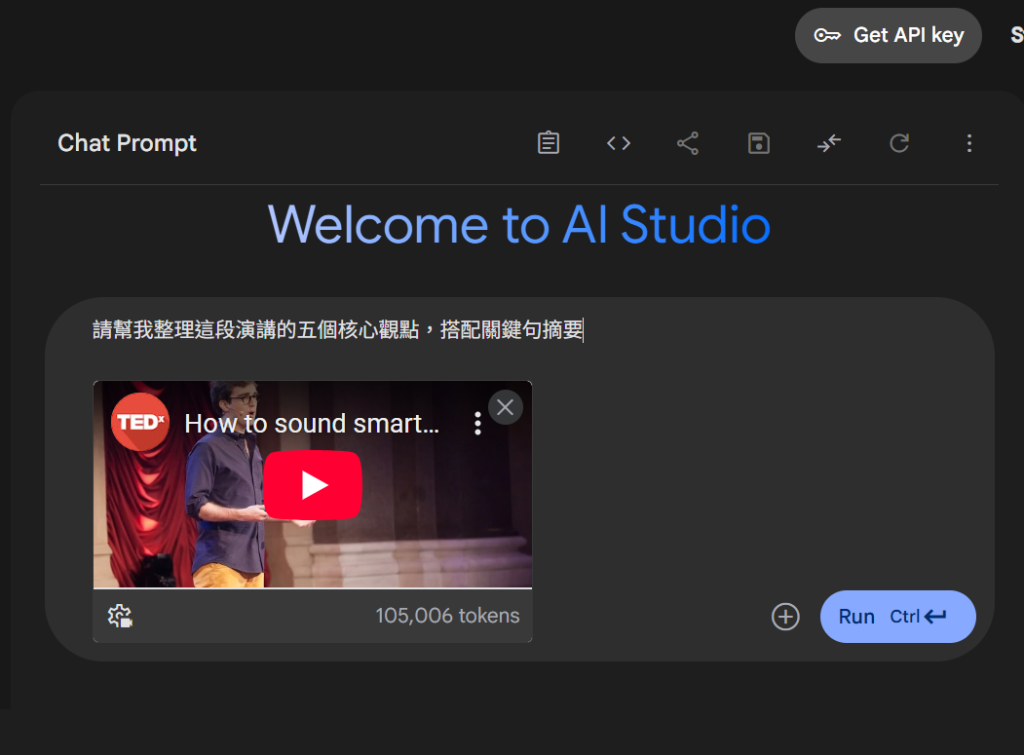
- Upload a video file or provide a working transcript.
- Input prompt: “Please sort out the 5 core points of this video and list H2 titles suitable for extending into an article.”
- If it is medical, financial, or legal content, please be sure to have it reviewed by professionals.
3. Generate scripts and first drafts of blog articles
Google AI Studio can produce scripts, article structures, social posts and presentation outlines. However, the first draft of AI is just a starting point, not a finished product. Content that can truly bring SEO results also needs to be supplemented with search intent, internal links, cases, trusted sources and brand tone.
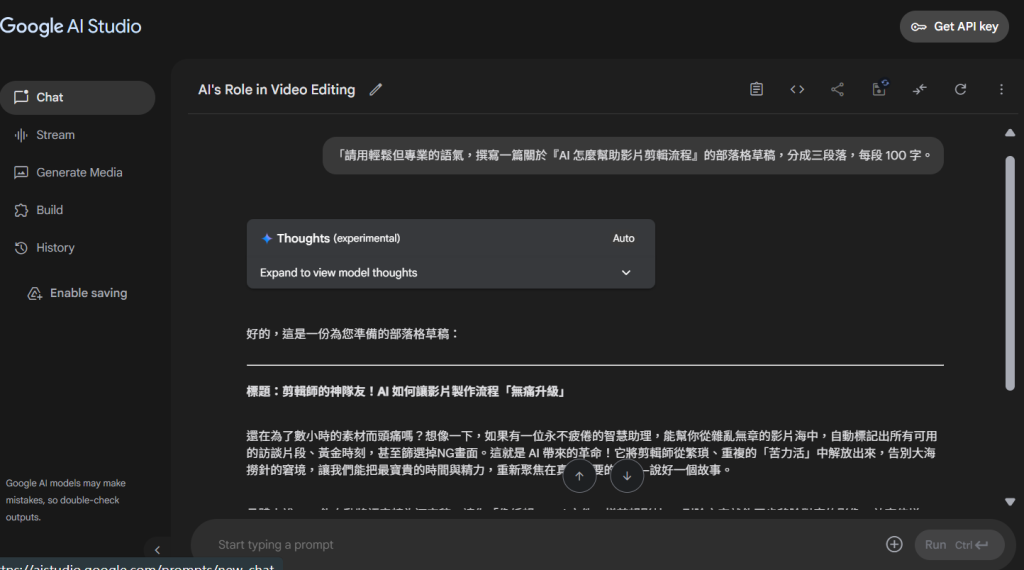
- Example prompt: “Please use a friendly and professional tone to help me plan a Google AI Studio tutorial article, including H2, H3, comparison table, FAQ and official source fields.”
- Advanced prompt: “Please organize this verbatim manuscript into a FAQ that can be cited by AI searches. The answers should be specific and not general.”
How to use Google AI Studio in AI SEO/GEO?
If your goal is AI SEO or GEO, Google AI Studio can act as a “content curation and testing tool.” It’s not a magic button that directly helps you rank, but it allows the content team to more quickly organize the material into a format that is easy for AI searches to understand.
Suitable for SEO work assisted by AI Studio
- Organize user questions: Organize interviews, customer service records, and consultation content into FAQs.
- Output content structure: Ask AI to plan H2, H3, comparison tables and paragraph highlights based on search intent.
- Repurposing audio and video content: Turn lectures, podcasts, and YouTube videos into articles, shortlists, or FAQs.
- Test AI search questions: Organize common questions about brands, services, and industries, and then test the search results of ChatGPT, Gemini, Perplexity, or Google AI.
- Enhance E-E-A-T: Ask AI to help you check whether articles are missing authors, experts, cases, sources, or update dates.
We would particularly recommend this to the medical industry. Contents such as dentistry, infertility, reproductive medicine, rehabilitation, and health media inherently require a high degree of accuracy and trust. AI Studio can help organize verbatim drafts and FAQs, but they still need to be reviewed by doctors, experts or editors before official release to avoid the content appearing complete but lacking professional basis.
Extended reading: How to do AI SEO / GEO? Will SEO be affected? , SEO copywriting | AI SEO/GEO content optimization, SEO consultant running plan.
Before using Google AI Studio, pay attention to data security and review process
AI Studio is easy to use, but don’t treat it as a risk-free data bucket. As long as it involves customer information, medical information, contracts, undisclosed financial information, account passwords, or internal company secrets, it is not recommended to directly upload the test.
- First do data classification: Which ones can be processed by AI and which ones can only be saved internally.
- Avoid uploading personal information: Be especially careful with your name, phone number, medical records, ID number, and payment information.
- Retain manual review: Verbatim drafts, abstracts, FAQs and first drafts of articles produced by AI must be reviewed by someone.
- Supplement the sources: AI is very good at organizing, but it does not mean that every sentence is correct. Important information should be returned to official or trusted sources.
- Do not publish directly: Especially medical, financial, legal and high-priced service content must be professionally reviewed.
Use Google AI Studio to turn AI into a content and workflow assistant
The most valuable thing to learn about Google AI Studio is not whether it can produce perfect articles at once, but that it can speed up a lot of previously time-consuming organizing work. For example, verbatim drafts, summaries, FAQs, film highlights, script outlines, and service page structures are all suitable for AI to help organize first, and then humans can judge which content is really worth publishing.
If you have clear work needs, such as writing, summarizing, converting meeting minutes to text, and reusing video content, AI Studio will be of great interest. But if your goal is SEO results, please remember to supplement the content generated by AI with brand opinions, cases, internal links, data sources, and answers that users really want to know.
If you are evaluating how to put AI tools into SEO or content processes, you can also start to understand the differences between AI Agents from OpenClaw vs. Manus AI, and then use AI Studio for content testing.
Reference sources
- Google AI Studio official website
- Google AI Studio Quickstart official document
- Gemini API Live API official document
- Introduction to Google Gemini model
- Google I/O 2026 developer highlights
- Google Search Central:Creating helpful, reliable, people-first content
Google AI Studio FAQ
Google AI Studio 是什麼?
Google AI Studio is a Gemini model testing and prototyping platform provided by Google. It can be used to test prompts, upload text, images, audio files and videos, and evaluate content summaries, verbatim drafts, program development or API connection processes.
Google AI Studio 可以做逐字稿嗎?
Yes. You can upload audio files or videos, and then use prompts to ask AI Studio to organize verbatim transcripts, meeting highlights, summaries, to-do items, or FAQs suitable for extension into articles. However, it is still recommended to manually proofread verbatim manuscripts, especially names, proper nouns and medical information.
Google AI Studio 可以用來做 AI SEO/GEO 嗎?
It can assist, but it cannot be accomplished by tools alone. AI Studio is suitable for organizing search questions, FAQs, article structures, video summaries, and content drafts; true AI SEO/GEO also requires website structure, Schema, E-E-A-T, internal links, cases, and manual review.
Google AI Studio 和 Gemini App 差在哪裡?
Gemini App is more like a chat assistant for ordinary users, suitable for daily Q&A, writing and data collection; Google AI Studio is more like an experimental platform for developers and advanced users, where they can test prompts, switch models, obtain API keys, and is more suitable for prototype testing.
Google AI Studio 適合 SEO 文章初稿嗎?
Suitable for first draft and structure organization, such as H2/H3, comparison table, FAQ, summary, internal link suggestions. However, before official release, editors or consultants still need to add search intent, brand opinions, real cases, credible sources and manual review.
使用 Google AI Studio 要注意資料安全嗎?
Yes. Do not upload customer personal information, medical information, unpublished financial reports, contracts, accounts or internal confidential documents. For highly sensitive industries such as medical care, finance, and law, it is more recommended to establish a data classification and review process first.
Google AI Studio 適合哪些人使用?
Ideal for content creators, SEO editors, marketers, YouTubers, educators, product managers and developers. As long as you often need to organize information, summarize long content, test prompts, or create first drafts of content in your work, you can use AI Studio as a productivity tool.
Frequently Asked Questions
What is Google AI Studio?
Google AI Studio is a Gemini model testing and prototyping platform provided by Google. It can be used to test prompts, upload text, images, audio files and videos, and evaluate content summaries, verbatim drafts, program development or API connection processes.
Can Google AI Studio do verbatim drafts?
Can. You can upload audio files or videos, and then use prompts to ask AI Studio to organize verbatim transcripts, meeting highlights, summaries, to-do items, or FAQs suitable for extension into articles. However, it is still recommended to manually proofread verbatim manuscripts, especially names, proper nouns and medical information.
Can Google AI Studio be used for AI SEO/GEO?
It can be assisted, but it cannot be accomplished by tools alone. AI Studio is suitable for organizing search questions, FAQs, article structures, video summaries, and content drafts; true AI SEO/GEO also requires website structure, Schema, E-E-A-T, internal links, cases, and manual review.
What is the difference between Google AI Studio and Gemini App?
Gemini App is more like a chat assistant for ordinary users, suitable for daily Q&A, writing and data collection; Google AI Studio is more like an experimental platform for developers and advanced users, where they can test prompts, switch models, obtain API keys, and is more suitable for prototype testing.
Is Google AI Studio good for SEO article drafts?
Suitable for first draft and structure organization, such as H2/H3, comparison table, FAQ, summary, internal link suggestions. However, before official release, editors or consultants still need to add search intent, brand opinions, real cases, credible sources and manual review.
Should I pay attention to data security when using Google AI Studio?
want. Do not upload customer personal information, medical information, unpublished financial reports, contracts, accounts or internal confidential documents. For highly sensitive industries such as medical care, finance, and law, it is more recommended to establish a data classification and review process first.
Who should use Google AI Studio?
Suitable for content creators, SEO editors, marketers, YouTubers, educators, product managers and developers. As long as you often need to organize information, summarize long content, test prompts, or create first drafts of content in your work, you can use AI Studio as a productivity tool.