
Have you ever heard the saying, “If a webpage takes more than 2 seconds to load, about half of visitors will leave”? To provide a better user experience, developers constantly strive to optimize website performance. However, how do you know if these optimization efforts are effective?Google launched “Core Web Vitals” to provide developers and website owners with a set of standards for evaluating website performance.
Core Web Vitalsis a set of goals launched by Google in 2020, specifically designed to help website administrators improve user experience. These metrics focus onpage loading speed, interactivity, and visual stability, ensuring that websites can run quickly and smoothly. It includes three main components:Largest Contentful Paint (LCP), Interaction to Next Paint (INP), and Cumulative Layout Shift (CLS). These metrics not only reflect the actual performance of the website when users interact with it, but also greatly influence Google’s ranking algorithm.
What are Core Web Vitals?
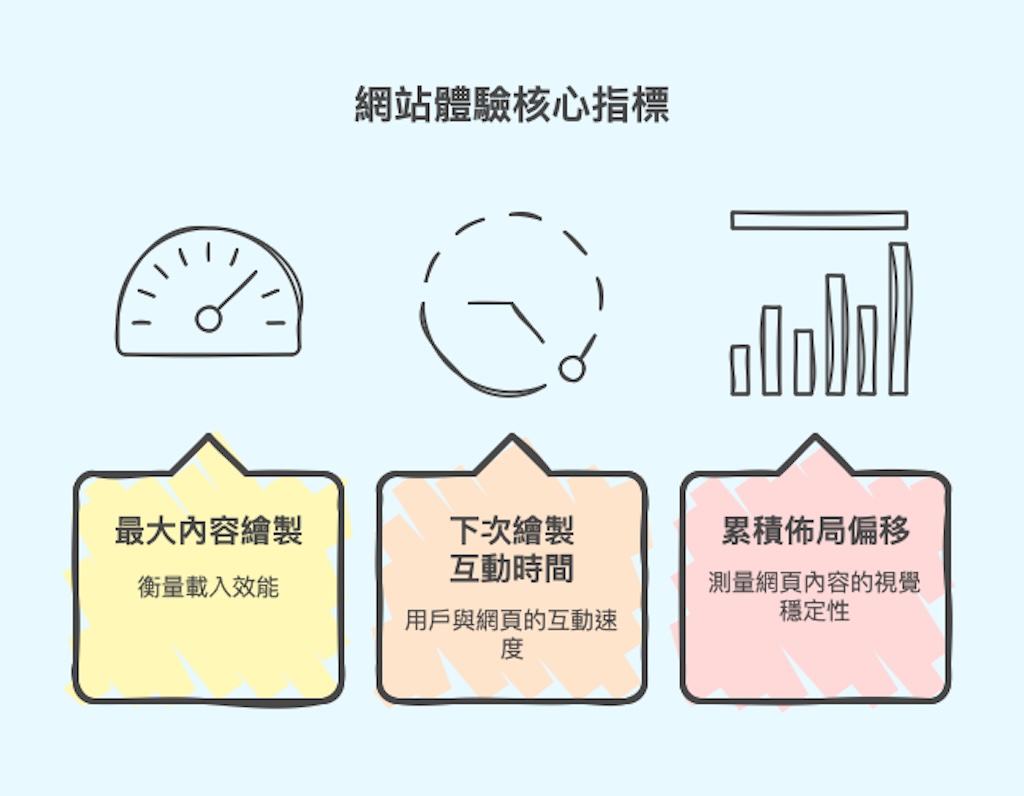
Core Web Vitals are a set of metrics proposed by Google to measure three major aspects of website user experience, including:
- Loading performance: How fast does the webpage load?
- Responsiveness: Can users interact with the webpage smoothly and quickly?
- Visual Stability: Is the web content stable during loading, without causing reading difficulties?
These metrics not only affect user experience but also directly relate to a website’s SEO ranking.
Core Web Vitals are not static; they are the result of continuous optimization based on Google’s long-term user behavior analysis. Currently, stable Core Web Vitals include three key metrics: LCP, INP, and CLS.
It’s worth noting that these metrics may be replaced due to accuracy issues. For example, starting in March 2024, INP officially replaced FID as one of the Core Web Vitals. Other Web Vitals include TTFB and FCP, but mostCreating a Websiteprocess, you only need to focus on optimizing the Core Web Vitals metrics.
Largest Contentful PaintLCP(Largest Contentful Paint)
Definition of LCP
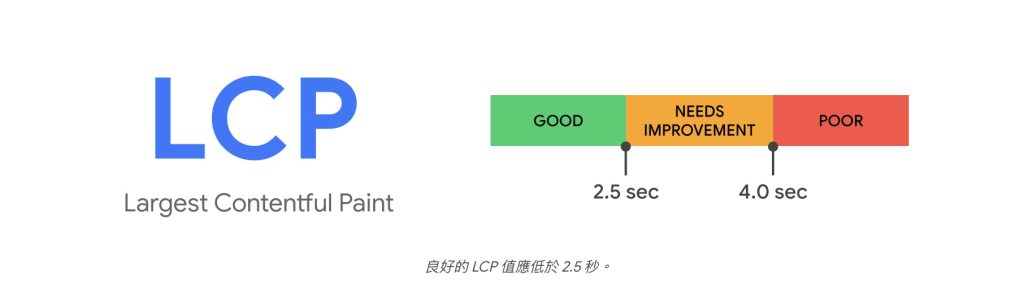
Largest Contentful Paint (LCP) is a metric that measures how quickly the main content of a web page loads. Specifically, it records the time from when a user starts loading the page until the largest visible content block (such as an image, video, or large block of text) on the page is fully rendered. LCP reflects the perceived loading speed of the page and directly impacts user-perceived performance. Ideally, LCP should complete within 2.5 seconds of the page starting to load to provide a good user experience.
Importance of LCP
The importance of LCP lies in its direct impact on a user’s first impressionIf pages load slowly, users may lose patience, leading to high bounce rates and low conversion rates.A good LCP can enhance user satisfaction and increase the time users spend on a page.For website administrators, optimizing LCP is an important step to improve user experience and search engine rankings.
Does slow website speed really affect SEO and customers?
Interaction to Next Paint (INP)Interaction to Next Paint )
Definition of INP
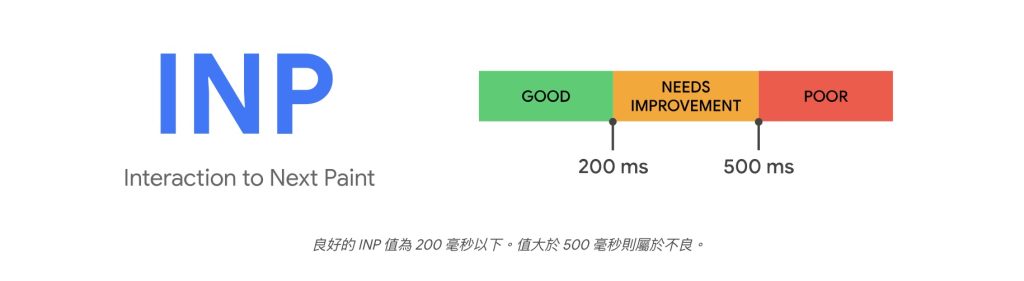
INP is a metric that measures the responsiveness of a webpage to user interactions, evaluating the overall performance of how quickly a page responds to user input.It primarily observes the delay time for all clicks, taps, and keyboard interactions during a user’s visit to a webpage. It collects all interaction behaviors on the page and assigns a score to each interaction event. If the INP is less than or equal to 200 milliseconds, it indicates good webpage responsiveness.
Importance of INP
The importance of INP lies in its impact on the user’s interactive experience with the page.A longer INP can make users feel that the page is slow to respond, thereby affecting user satisfaction. By optimizing INP, websites can ensure that users can interact quickly with the page, improving the overall user experience.
Cumulative Layout ShiftCLS(Cumulative Layout Shift)
Definition of CLS
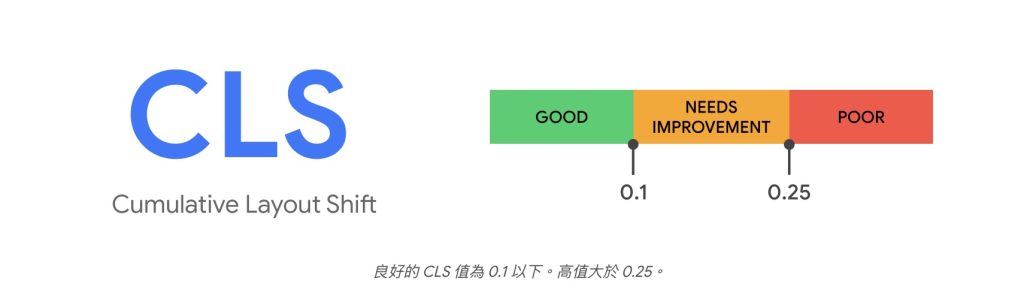
Cumulative Layout Shift (CLS) is a metric that measures the visual stability of a page.It records the frequency and extent to which elements on a page unexpectedly move during loading. CLS reflects the visual stability of a page, and ideally, the CLS value should be less than 0.1.
Importance of CLS
The importance of CLS lies in its impact on the user’s browsing experience. Unexpected movement of page elements can lead to users accidentally clicking on the wrong things, causing frustration. By optimizing CLS, websites can ensure that pages remainvisually stableduring loading, enhancing the user’s browsing experience.
Why areCore Web Vitalsimportant?
Core Web Vitals not only affect a user’s first impression of a website but also directly relate to the website’s SEO ranking.
1. Enhance User Experience
Websites that comply with Core Web Vitals can provide a smoother and more stable browsing experience, making users more willing to stay and interact. The improvement in user experience is not only reflected at the technical level but also directly affects user satisfaction and engagement. Studies show that websites with loading times exceeding 2 seconds may lead to half of users abandoning their visit. Therefore,optimizing Core Web Vitals can effectively reduce bounce rates and increase user time on pages.
2. Improve SEO Ranking
Google has incorporated Core Web Vitals as one of the ranking factors in its search engine algorithm.Optimizing these metrics helps improve a website’s visibility in search engines.Specifically, good Core Web Vitals can lead to higher rankings in search results. For website owners, focusing on and optimizing these metrics isa crucial step to improve SEO rankings.By optimizing Core WebVitals, websites can not only enhance user experience but also gain an advantageous position in fierce market competition.
3. Increase Website Traffic and Conversion Rates
A good user experience helps attract more users to the website and increases the time they spend on the site, the number of pages they view, and the likelihood of conversion.
MeasuringCore Web VitalsTools
To effectively measure Core Web Vitals, website administrators can utilize various tools. These tools provide detailed performance data and optimization suggestions, helping website administrators identify and resolve performance issues.
- PageSpeed Insights: This is a powerful tool provided by Google that analyzes web page speed and offers optimization suggestions. PageSpeed Insights not only displays lab data but also provides real user data, helping website administrators gain a comprehensive understanding of web page performance.
- Search Console: Google Search Console, a website management tool provided by Google, allows you to view not only SEO-related data but also a consolidated report on your website’s Core Web Vitals. It meticulously lists all pages on your website with performance issues and offers suggestions for improvement.
- Chrome User Experience Report: This report collects anonymized real user data, allowing website owners to quickly assess their performance. This data supports the Core Web Vitals reports in PageSpeed Insights and Search Console.
Core Web VitalsFuture Development
As Google’s important standard for evaluating web page user experience, Core Web Vitals may continue to evolve with technological advancements and changes in user needs. Google may introduce new metrics to more comprehensively reflect user experience. For example, with the popularization of mobile devices, mobile user experience may receive more attention.Google may add specific metrics for mobile devices to ensure a consistent user experience across different devices.
In addition, with the advancement of web technology, new performance optimization techniques and tools may be introduced. These technologies will help developers optimize web performance more effectively, thereby improving the performance of Core Web Vitals. In the future,Core Web Vitals may become more intelligent, capable of automatically identifying and suggesting optimization solutions, helping website administrators improve user experience more easily.。
Essential Optimization Keys for a Successful Website
Core Web Vitals not only affectuser experience, but are also directly related towebsite SEO ranking. Optimizing these metrics helps improve a website’s visibility in search engines.Good Core Web Vitals mean fast website loading speed, strong interactivity, and high visual stability, all of which can increase user satisfaction and engagement. To ensure that a website stands out in a competitive market and gains higher visibility in search engines, attracting more users, website administrators should continuously monitor and optimize these metrics.
If you have more questions about website optimization and speed improvement, feel free to message Orca to help you solve them once and for all!