
Google Search Console and Google Analytics are two separate tools with different strengths. Together, they give website owners a much clearer view of performance, user behavior, and conversion opportunities.
Although each tool solves a different problem, combining them helps you understand keyword performance, user interaction patterns, and conversion efficiency much more completely. That makes it easier to evaluate SEO results, measure the impact of Google Ads, and fine-tune your site so it can stand out in search results.
In this article, we will look at how Google Search Console and Google Analytics each support SEO and improve Google Ads conversion analysis.
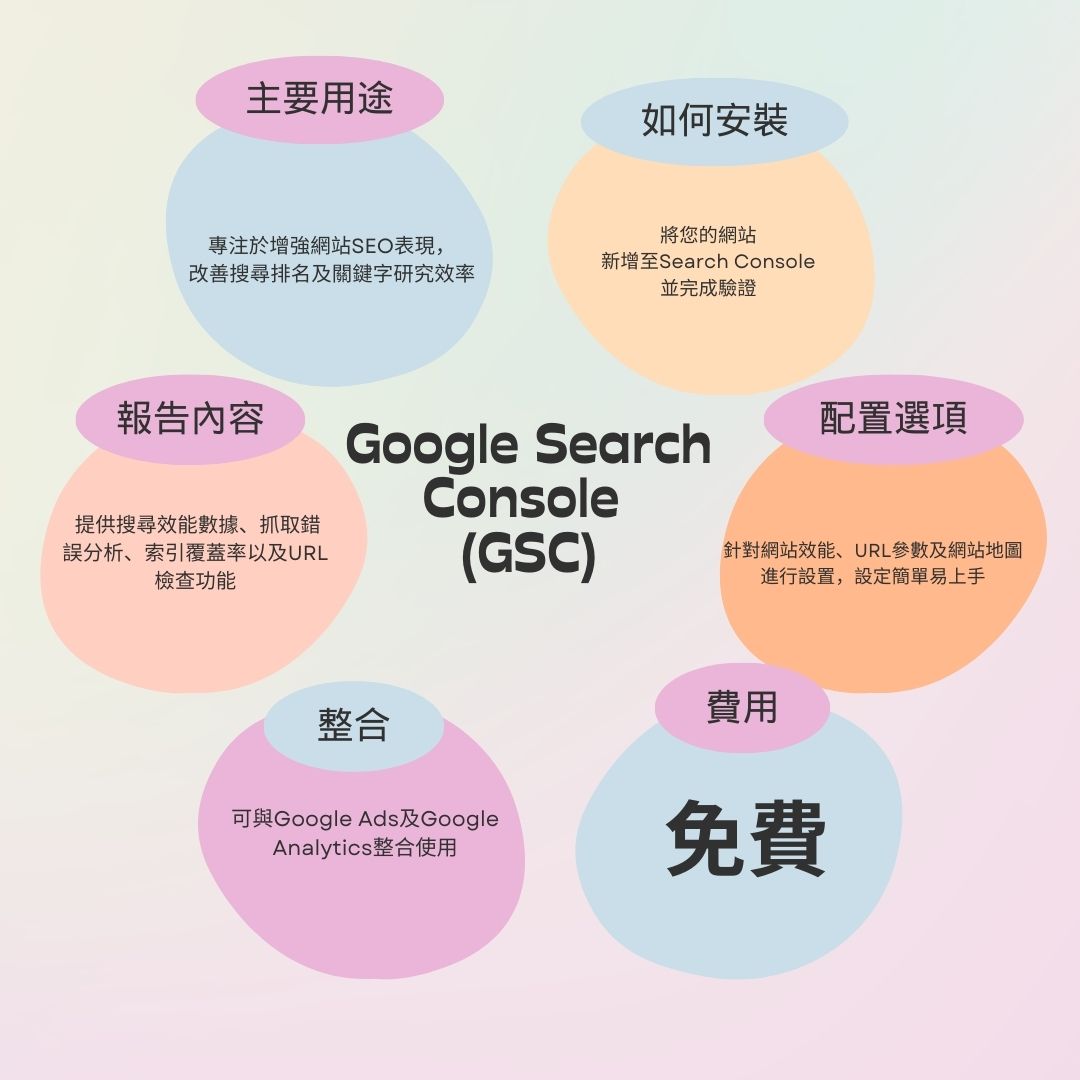
Google Search Console (GSC): A Powerful Keyword Performance Tool
GSC is a flexible tool focused on search performance. In SEO work, it helps you track how different pages rank for keywords, identify problems that affect organic traffic, and find targeted optimization opportunities. Its scope is mostly organic search, so it is not designed to analyze Google Ads campaigns in depth.
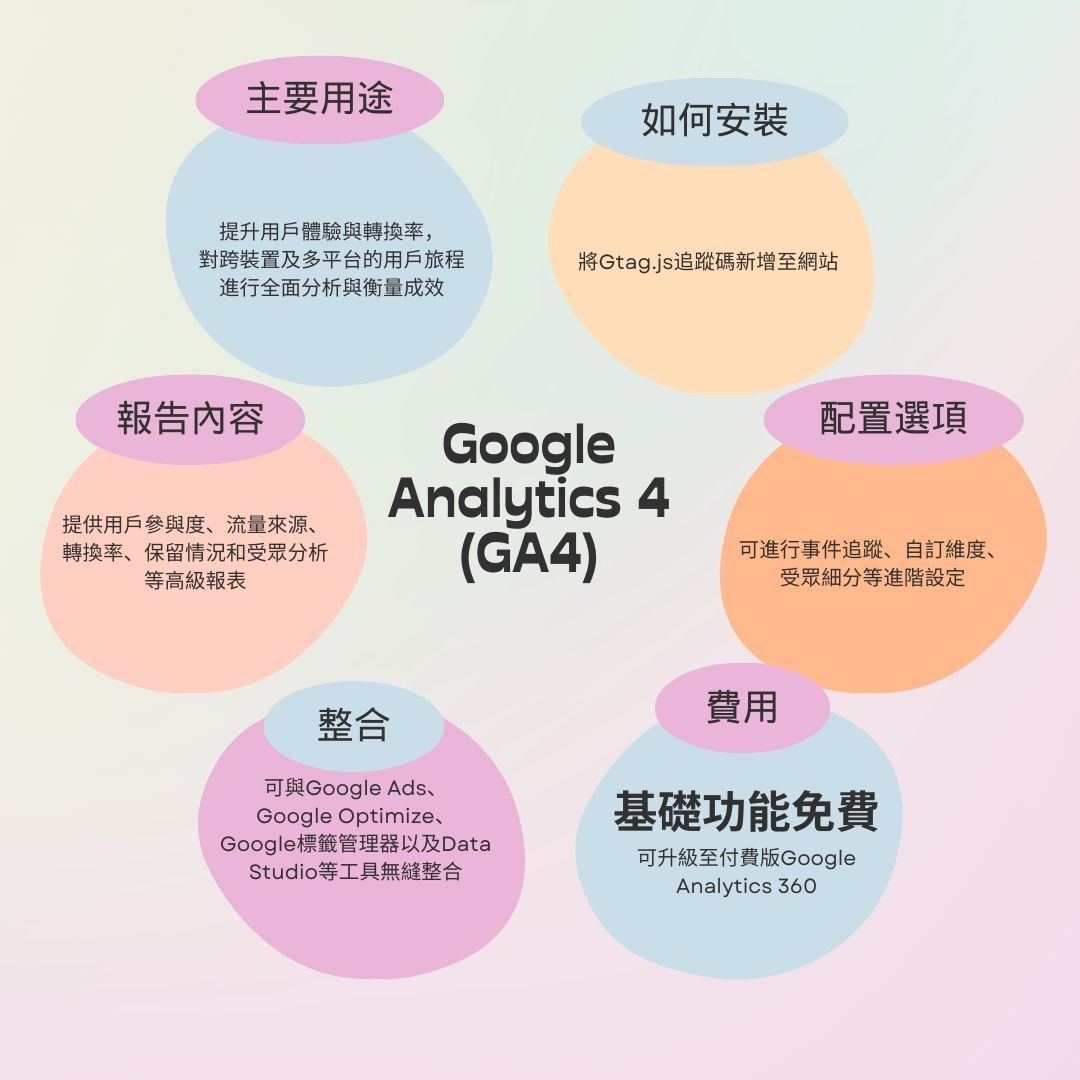
Google Analytics (GA4): A Better Way to Understand Website Traffic
GA4 focuses on user behavior and marketing effectiveness, helping you track conversions and make better decisions based on detailed data. Since the upgrade from Universal Analytics, GA4 has become much stronger for cross-device behavior insights and for showing the full visitor journey in a more intuitive way.
In short, GSC is best for measuring SEO performance, especially search visibility and technical optimization, while GA4 is more focused on user behavior and broader marketing performance. Used together, they give your site and campaigns much stronger decision-making support.
What Is the Difference Between GSC and GA4?
| Feature | GSC | GA4 |
|---|---|---|
| Search performance | Shows impressions, clicks, and average position for pages in Google Search results, and lists links to your site from Google Search. | Does not directly track search performance, but tracks traffic and user behavior such as sessions, views, and bounce rate. |
| Google Ads performance | Not shown clearly. | When integrated with Google Ads, GA4 can show campaign-level data such as clicks, impressions, CTR, and CPC. |
| Error messages | Reports crawl errors and site issues such as broken links, missing pages, and server errors. | Shows errors related to GA4 configuration, Universal Analytics migration, and integrations with tools such as Google Cloud and Firebase. |
| URL inspection | Lets you inspect how a specific URL appears in Google Search and submit URLs for indexing. | None. |
| User behavior | None. | Lets you analyze what users do after clicking your ads or landing pages, including pages visited, time on site, revenue, and bounce rate. |
| Mobile usability | Shows which pages are mobile-friendly and provides suggestions for pages that are not. | Shows the percentage of visitors using mobile, desktop, or tablet devices. |
Using GSC for Keyword Research
One of the biggest strengths of Google Search Console is how clearly it shows your site’s search performance.
Important metrics in GSC include:
- Clicks: how many times users clicked from Google Search to your site.
- Impressions: how many times your title and description appeared in Google Search results, whether clicked or not.
- CTR: the percentage of impressions that became clicks. Strong rankings usually lead to higher CTR.
- Average position: your site’s overall ranking position in search results.
The most effective SEO strategy is usually to improve keywords that are already performing well rather than trying to optimize completely unrelated terms. When you combine GSC with other keyword research tools, you can see where your strengths are and use keyword gap analysis to find related terms you have not covered yet.
Using GA4 to Improve Website Conversions
GA4 gives you a huge amount of website data without requiring complicated setup, and that data can help improve conversions. For example, audience overview reports let you see visitor gender, interests, age, and device type. With that information, you can judge whether your content matches your target audience and whether it really connects with them.
Useful GA4 features for conversion optimization include:
- Set conversion goals: purchases, form submissions, newsletter signups, and any other action you want users to take.
- Track key metrics: conversion rate, traffic source, bounce rate, average session duration, and goal completion all help you find optimization opportunities.
- Use funnel reports: these help you see where users drop off during the conversion process.
- Set UTM parameters: add tracking parameters to your campaigns so you can see which channels drive the most conversions.
Why Combining GSC and GA Matters
Using both tools at the same time is essential because they provide different but complementary insights:
- Valuable insights: together, they show how users find your site and how they interact with it.
- Stronger SEO: GSC helps with crawl errors and keyword performance, while GA adds traffic behavior and conversion data.
- Free and easy to use: both tools are free, which makes them ideal for small businesses and solo operators.
Conclusion
GSC and GA are similar in some ways, but each one serves a different purpose. GSC is mainly for monitoring search performance, while GA focuses on how users interact with your site and where that behavior comes from. When you use both together, you can understand search results before users even arrive on the site.
You can also access GSC data inside your GA account, which gives you more insight into organic traffic, search queries, landing pages, and more. That makes website planning and marketing strategy much more effective.