
Which social network is driving the most traffic to your site? Or do you want to know how well a newsletter campaign performed?
If you do not know yet, that is okay. But imagine being able to answer your boss in just a few seconds the next time they ask.
What about revenue by social channel? Or the ratio of traffic coming from social media versus email?
You can track all of it, and it is free. All you need is Google Analytics and a little UTM link tagging.
UTM parameters do more than solve the questions above. They also help you track multiple campaigns and give you the data you need to optimize them.
In this article, we will cover the basics of UTM tracking and show how to use it to improve your marketing campaigns.

What Are UTM Parameters?
UTM stands for Urchin Tracking Module. It is a campaign tracking system used in analytics tools to customize source, medium, and campaign tracking. By appending parameters to the end of a URL, you can measure traffic, conversions, and other campaign results, understand what is actually working, and see in your analytics reports which channels are driving quality traffic and which ones are not. That makes it easier to evaluate your marketing ROI.
Why Are UTM Parameters Important?
If you spend a lot of time on social media, you may publish hundreds of new links every day.
UTM codes help you track the performance of each link so you can see where your traffic comes from. You can use UTM variables in your links to measure broad performance, such as how much traffic social media sends your way. You can also use them to track smaller details, such as how much revenue comes from a specific YouTube campaign.
There are many ways to track UTM-tagged links. The good news is that if you build a strategic tagging system now, you will save a lot of time later. But before we dive in, let us set expectations for what a properly tagged URL can do for you.
UTM links can answer three basic questions.
Once everything is set up, a single link should help you answer the core questions about your traffic:
- Where did the traffic come from?
- How did it get to me?
- Why did it come to me?
In short, UTM codes tell the story of how your traffic reached you.
A normal URL looks like this:
https://example.com
But if you add UTM tags, your URL may look like this:
https://example.com/?utm_source=newsletter&utm_medium=email&utm_campaign=onboarding
Okay, now that you understand what UTM tracking codes are, let us look at how they work.
How Do UTM Parameters Work?
A URL with UTM codes works like any other clickable link. The difference is that when a user clicks it, Google Analytics uses the UTM tags to distinguish that URL from all the others.
It uses UTM parameters to record information such as visitor count, traffic source, keywords, clicks, and more.
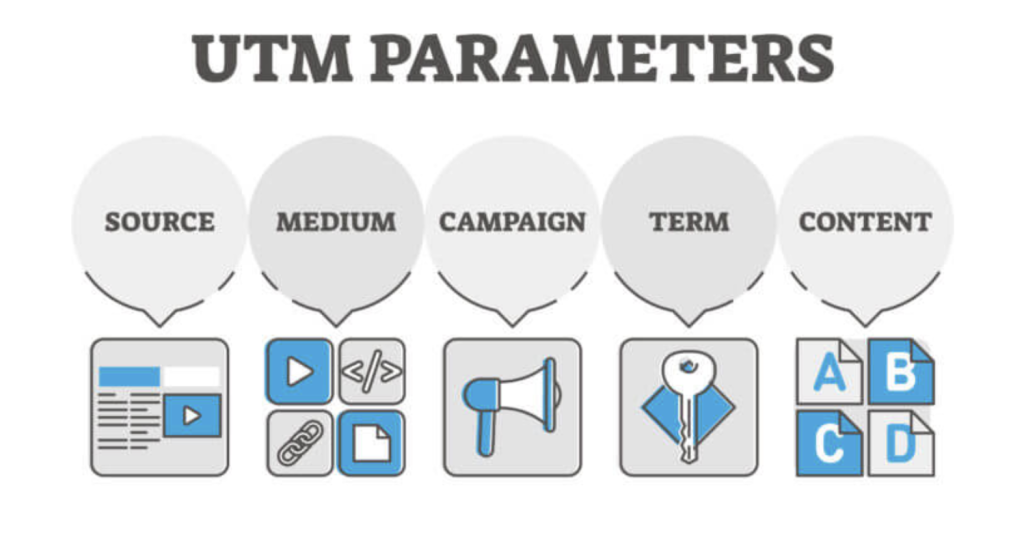
The Five Core UTM Parameters
- Source (utm_source): identifies which site sent the visitor, such as Google, Facebook, Twitter, or a newsletter.
- Medium (utm_medium): identifies the channel type, such as email, social media, or paid ads.
- Campaign (utm_campaign): identifies the campaign, product, or keyword, such as a summer sale.
- Term (utm_term): tracks the specific keyword or phrase used in paid search campaigns.
- Content (utm_content): distinguishes different versions of the same ad or campaign and helps you see which element users clicked, such as a CTA or banner.
Five Ways to Use UTM Parameters
Now that we have covered the basics, let us look at a few practical ways to use UTM parameters.
1. Measure social media ROI
UTM tags help you validate the work you are doing on social media. By adding UTM parameters to your social links, you can see which campaigns are most effective at generating traffic and conversions.
Based on the data, you can optimize the rest of your campaigns and measure social ROI more accurately.
For example, if you are running a giveaway and want to know which social platform performs best, you can add UTM tags to the URLs used in each channel and compare the results.
2. Track newsletter performance
Want to know which newsletter brings the most visitors to your site? Add UTM parameters to the links inside it.
If one newsletter generates a lot of traffic, that means users liked the content and found it worth clicking. On the other hand, it also shows which emails underperformed, so you can avoid similar copy and templates later.
3. Find the best placement for banner ads
If you are running multiple paid campaigns, it is important to know where your ads are displayed. UTM parameters help you see which sites are showing your ads and give you data about ad placement.
For example, if you run two different banner ads for the same product, one placed in the sidebar and another in the footer, the UTM-tagged URLs will tell you which placement gets more clicks and conversions.
4. Track CTA performance
UTM parameters are also useful for finding out which type of call to action brings in the most traffic.
By adding UTM parameters to different CTA links, you can see how text, color, design, size, and position affect click-through rates. Then you can use the data to improve conversions.
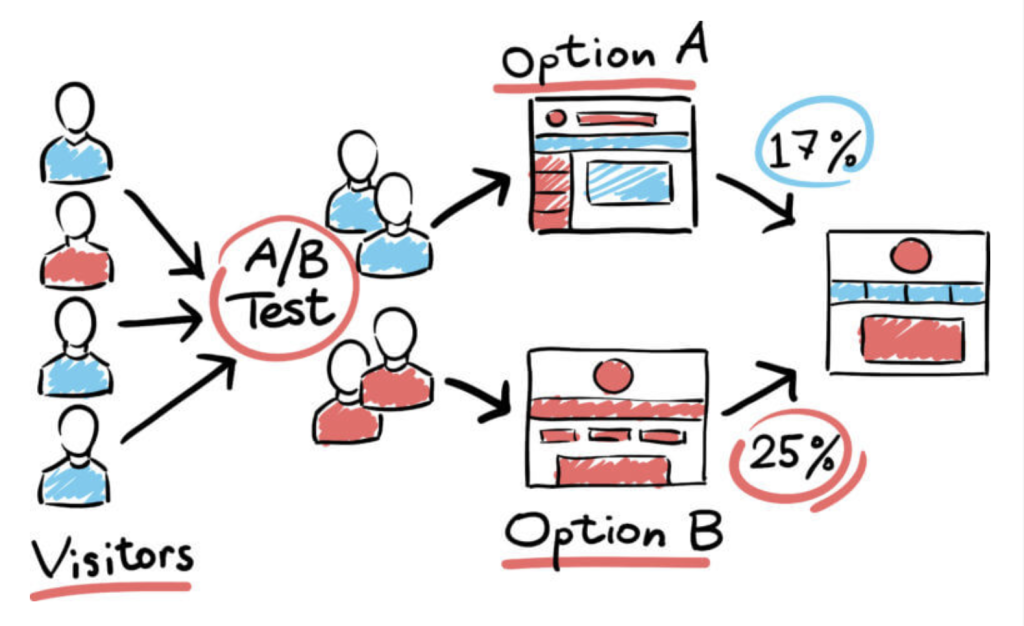
5. Run A/B tests
If you are running A/B tests on your site, UTM parameters make it easier to distinguish between different links that point to the same product or page.
The content tag (utm_content) is especially useful for A/B testing. You can tell your analytics tool where the link appears, such as on a logo or in body text.
Now that you know how to use UTM parameters, are you ready to build UTM codes for your URLs?
How to Create UTM Codes in Google Analytics
Now that you understand the benefits of UTM tags, let us look at how to apply them effectively in your marketing campaigns.
Creating UTM tags may sound complicated, but it is actually simple. The easiest way is to use Google’s Campaign URL Builder, which quickly generates URLs with UTM tags. You just fill in the required fields and copy the generated link.
Step 1: Start with the URL of your website. This is the destination where you want visitors to land.
Step 2: Add UTM parameters. These are the tracking variables you attach to the URL.
Step 3: Test and track. Once you have your tagged URL, test it to make sure it works correctly. Then use analytics tools like Google Analytics to track performance and gather insights.
Let us say you are preparing an annual sale campaign. If you want to promote it with Google paid keywords, here is what you can enter in the URL Builder:
Use the Campaign URL Builder to add UTM tags to this sample URL:

1. Enter the website URL you want to tag
2. Fill in the fields: source = Google / medium = CPC / campaign = annual_sale
3. Copy the generated campaign URL and paste it into your keyword link.
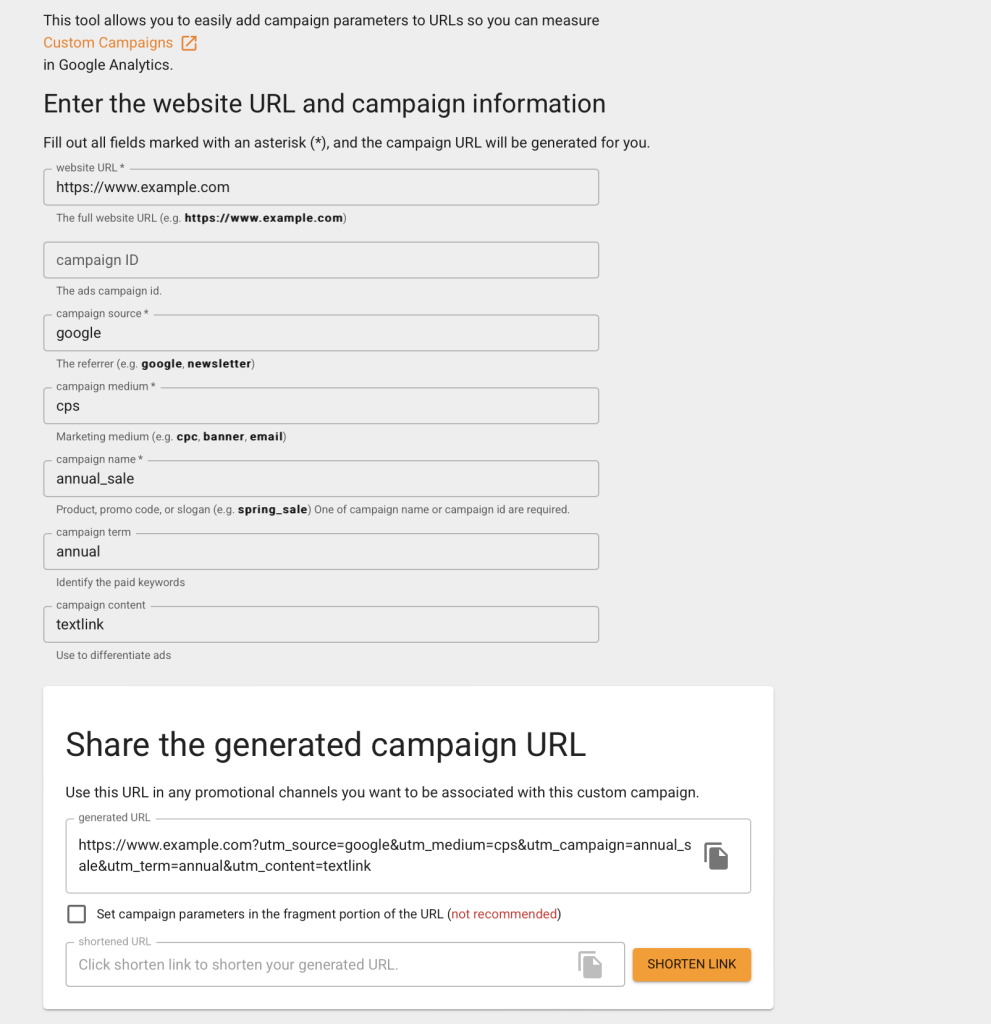
Campaign URL Builder generates the link for you automatically. Just copy it and apply it to your campaign.
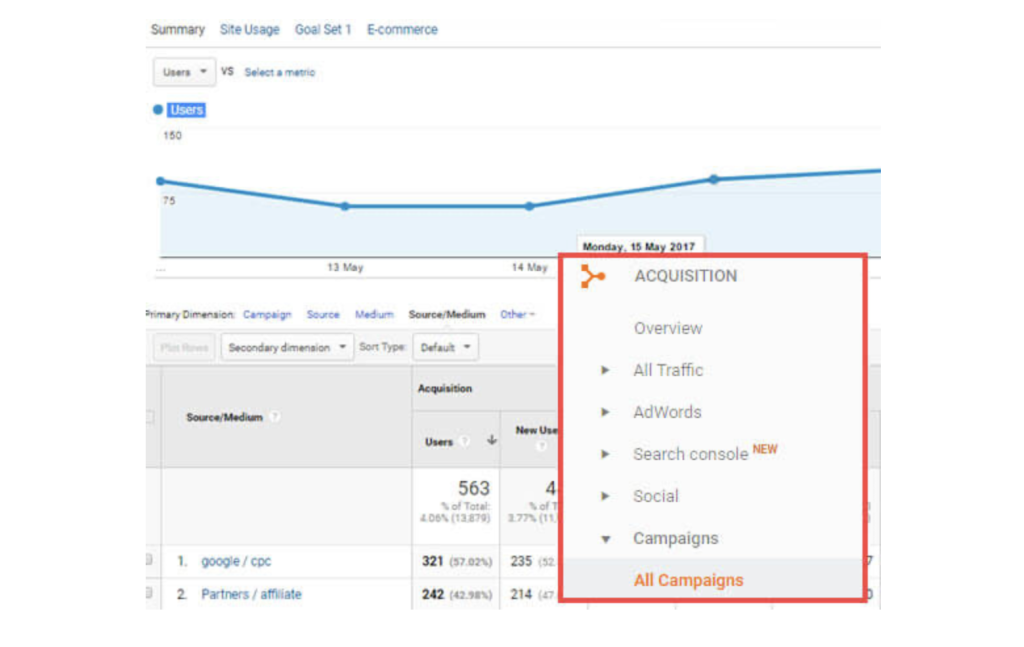
Then you can view the report in Google Analytics. Log in to your Google account and go to Acquisition » Campaigns » All Campaigns to see all campaign data.
UTM Best Practices
1. Use Google Analytics correctly
When a user opens your site, the tracking script running is the GA script. It reads the referrer to help explain how visitors reached your site. Make sure Google Analytics gets as much real data as possible. Without UTM tags, GA cannot extract detailed information about where users came from.
2. Never use UTM tags for internal links
When a new visitor lands on a URL with UTM parameters attached, Google Analytics treats it as a new session. GA assumes UTM tags are only for external links and resets session-level data for each session, which can make your reports messy and inconsistent.
3. Keep parameter casing consistent
Consistency matters. If you send daily or weekly emails and want to capture the data, use the same formatting and naming conventions so sorting and analysis stay easy. Because GA treats URLs as separate records when the letter case changes, even if the page is the same, your data becomes inaccurate and harder to combine.
4. Avoid spaces and special symbols
If you want to avoid messy URLs, do not use spaces or symbols in UTM tags. In UTM URLs, characters like “?” and “&” have their own meanings, so avoid them in parameter values. When needed, use “+” or “_” instead, such as utm_campaign=spring+sales or utm_campaign=spring_sales.
5. Do not include private information in UTM values
UTM parameters are visible in every visitor URL. Personal or private information should never be placed in UTM tags, such as a person’s name, email address, or phone number. Collecting personal data in Google Analytics also violates their terms of service.
Get UTM Right, and Your Digital Marketing Starts Strong
With the information collected through UTM codes in Google Analytics, you will have a clear picture of your traffic sources, ad performance, and user behavior. From there, you can use the data to optimize your marketing work for the biggest possible impact.
In other words, UTM parameters help us track campaign and channel performance more accurately, including traffic and conversion rates. At the same time, you should keep naming conventions consistent and analyze the data carefully. Only accurate tracking and analysis can truly improve campaigns, raise conversion rates, and increase ROI.