Google Analytics is the go-to platform for website and app owners who want to understand performance. If you know where your traffic comes from, you can better understand your users and make smarter decisions about where to invest your time and budget.
Traffic reports in Google Analytics are essential because they clearly show where your website traffic is coming from, which channels bring in the most visitors, and how that data can help improve your website, user experience, and conversion rate. In this article, we will look at the key parts of GA4 traffic reports and how to read them for better marketing decisions.
What are UTM parameters? A must-have tool for accurate traffic tracking
Can Google Analytics track traffic sources?
GA4 is excellent at tracking website traffic sources. Beyond simply finding the report, the real value comes from understanding what each traffic source is doing and using those insights to create the results you want.
Where can you see traffic sources in Google Analytics 4?
1. Reports > Overview
Use the overview report to see how your main channels are bringing visitors to your site. This report is often used to compare marketing channels and identify which ones send the most traffic.
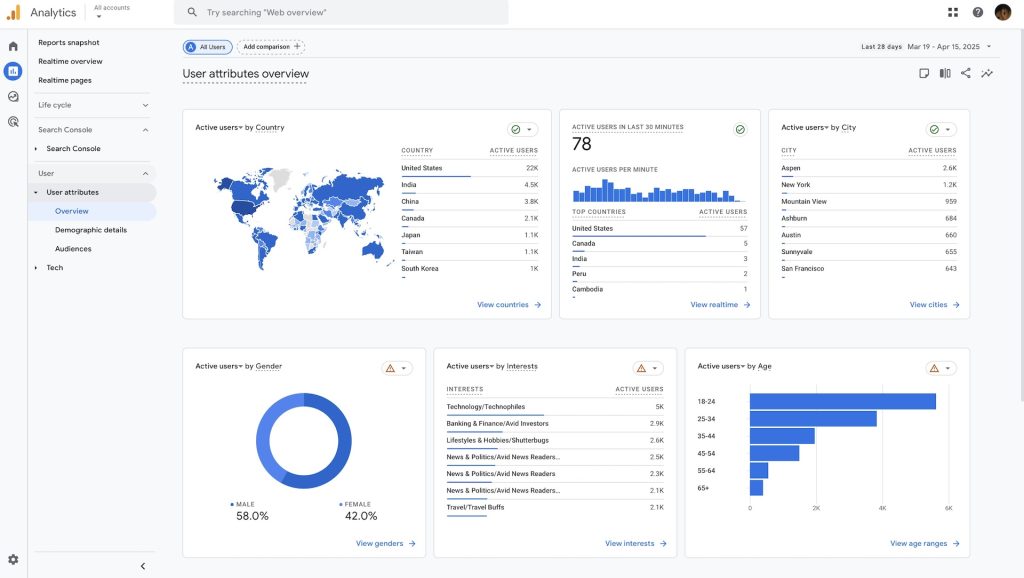
2. Reports > User acquisition
This report helps you understand how traffic is distributed across the different channels that attract users to your site.
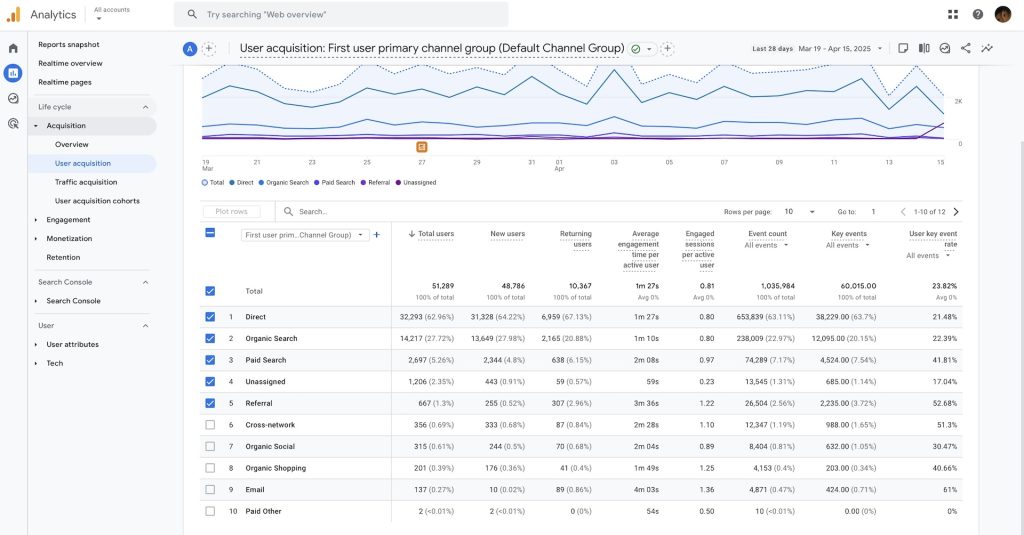
3. Reports > Traffic acquisition
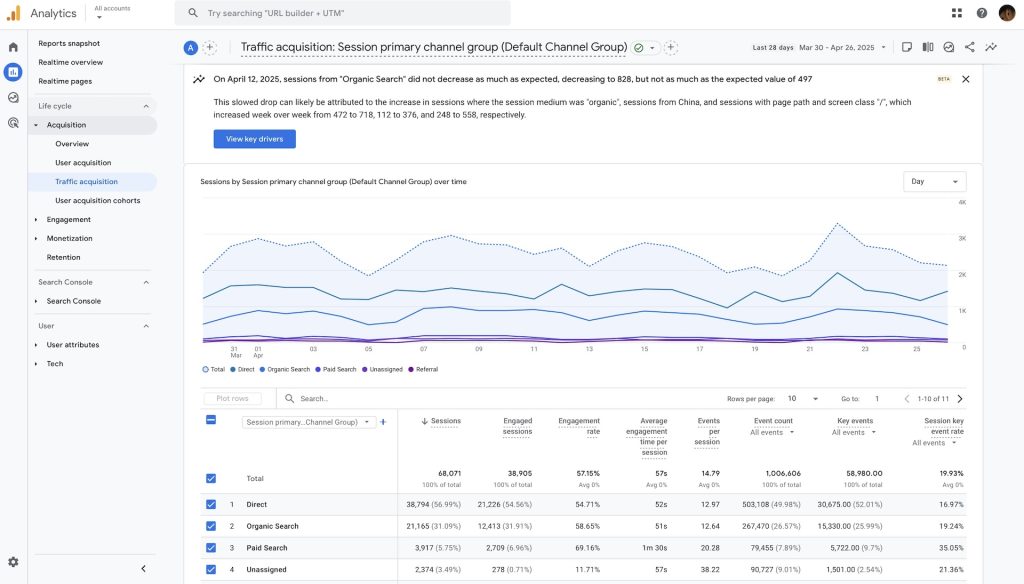
What are the common traffic sources in GA4?
GA4 groups website traffic into several categories, often called channels or sources. These include organic search, paid traffic, and referrals. Breaking traffic down by channel helps answer one of the most basic questions in digital marketing: How do users find my website?
- Direct: Users arrive by typing the URL, using a bookmark, or otherwise visiting directly.
- Organic Search: Users click a non-ad result in a search engine.
- Referral: Users arrive through a non-ad link from another website or app, such as a blog or news site.
- Organic Social: Users click a non-ad link from social networks such as Facebook or X.
- Email: Users arrive through a link in an email.
- Organic Video: Users click a non-ad link from video platforms such as YouTube, TikTok, or Vimeo.
- Affiliates: Users arrive through a link shared by an affiliate partner, creator, or influencer.
- Cross-network: Users arrive through ads served across multiple ad networks.
- Paid Search: Users arrive through ads in search engines.
What is the difference between organic search and paid search?
Organic search and paid search appear in the same search engine results page, but they are very different. Paid results usually appear at the top of the page, followed by organic results. Depending on the search term, paid results may also appear at the bottom.
Even though both appear in SERPs, there are some important differences:
- Organic rankings are earned, so they usually feel more trustworthy than paid results.
- Organic search is free, and better content quality and credibility keep bringing clicks over time.
- Once you stop paying for ads, paid search stops generating clicks.
Organic traffic is also more likely to bring qualified leads to your site.
Why should you measure organic traffic?
The main goal of SEO is to bring relevant organic traffic to your site. Growth in organic traffic over time is one of the clearest signs that SEO is working. If traffic from search engines rises month by month or quarter by quarter, that usually means your SEO performance is improving.
Understanding referral traffic
Referral traffic is the channel Google uses to report visits that come from websites outside search engines, social networks, and email. If someone clicks a link on another site and lands on yours, Google Analytics usually counts that as referral traffic.
Why is referral traffic valuable?
Referral traffic matters because it can send qualified visitors from another trusted website to yours. These backlinks can make your content more visible, not just through organic search. If the referring site is trustworthy, it can also strengthen your content’s credibility, much like a recommendation from a friend makes you more willing to try a new restaurant. Google treats referral traffic from backlinks as a sign of social proof, which can improve perceived authority and trust.
What is Unassigned?
Besides the common traffic sources above, you may also see “Unassigned” in GA4 reports. This means GA4 collected the data but could not decide which channel it belongs to. When no channel rules match the event data, GA4 places the traffic into Unassigned.
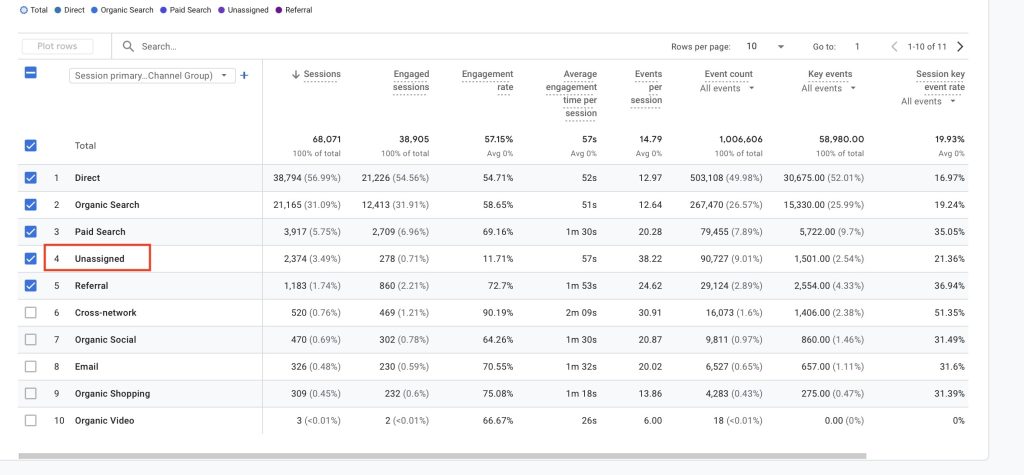
Why does Unassigned happen in GA4, and how do you fix it?
- Data is still processing: Wait 24 to 48 hours for GA4 to finish processing before checking again.
- Missing UTM parameters: If campaign links do not include the required UTM parameters, GA4 cannot classify the traffic source correctly.
- UTM naming does not follow Google rules: Parameter names should use letters, numbers, or underscores. Channel names should follow Google conventions, such as `email` instead of `newsletter` or `EDM`, and `facebook` instead of `fb`.
- Tracking code is installed incorrectly: If the site tag is set up incorrectly, traffic may be classified as Unassigned. Check your implementation carefully.
What are UTM parameters? A must-have tool for accurate traffic tracking
Conclusion
With GA4, you can see not only where your traffic comes from, but also how users behave once they arrive. These insights are valuable for making decisions about marketing budget allocation, content planning, design, and user experience.
In short, more traffic means more opportunities to build leads and sell products or services. User interactions alone do not guarantee business success, but bringing people to your site is the first step toward building a strong online business.
In this article, we explained how to use GA4 to track website traffic sources and the difference between organic and paid traffic. If you want to learn more about other GA4 features, feel free to contact OrcaBiz.