
When you first start usingGoogle Analytics(hereinafter referred to as GA), the various knowledge can be overwhelming. However, there is one tool that is particularly suitable for marketing beginners: the UTM tagging tool.。
Through this tutorial, you will quickly learn how to use UTM to track traffic sources and accurately grasp the effectiveness of marketing campaigns. In just five minutes, learn the basic settings and practical skills of UTM to improve website traffic analysis efficiency!
1. What is UTM?
Before we start to understand UTM, you must first understandGA4(Google Analytics 4)this tool. GA4 is a website analytics tool provided by Google, used to track and analyze website traffic and user behavior. GA has a wide range of functions, covering a series of services such as traffic analysis, search engine optimization, and advertising monitoring, just like acore headquarters of a groupcollecting all important information about the website.
As the core headquarters, GA needs to regularly check the performance of each traffic source, understand which areas are performing well, which need improvement, and even evaluate whether it is necessary to close unprofitable businesses. Only by mastering accurate data can the operational status of the entire group be effectively managed.
UTM plays the role of a “traffic source identifier” in GA4. Its task is to clearly mark the source of each piece of traffic, allowing GA to accurately distinguish the performance of different marketing campaigns. You can also imagine UTM as adiversion tool for sub-brands under a group.。
UTM allows you to understand which marketing activities bring the most results. Whether it’s ad clicks, email marketing, or social media sharing, UTM parameters help you analyze where users are coming from to your website. With UTM tags, you can also flexibly adjust settings based on different marketing channels and materials, making it an essential practical tool for every marketer entering the world of GA4.
UTM Practical Use Cases
- Where Does Traffic Come From?
Marketers may collaborate with multiple KOLs to promote a campaign. By addingUTM parametersto the URL, they can clearly distinguish the traffic source and performance brought by each KOL, such as click-through rates and conversion rates. The data will be directly presented in the GA4 system, eliminating the need for additional report exports and calculations, thus quickly and effectively assisting marketing decisions. - Quick A/B Testing to Find the Most Effective Optimization Strategy
In marketing campaigns, multiple versions of landing pages are designed to attract different user groups. By adding UTM parameters, marketers can precisely track the traffic and performance of each version, propose the best improvement plans, and enhance the web experience flow. - Offline Marketing Campaign Performance Analysis
In addition to online digital marketing, marketers often engage in offline physical activities. Through UTM tracking, marketers can design physical flyers and promotional advertisements and embed QR codes with UTMs, easily monitoring traffic to evaluate performance and propose enhancement or improvement plans.
II. Simple Three-Step UTM Setup
The UTM tool is easy to use and doesn’t require an engineer’s assistance. Follow the editor below to see how to set up UTM and observe traffic sources!
1. UTM Structure
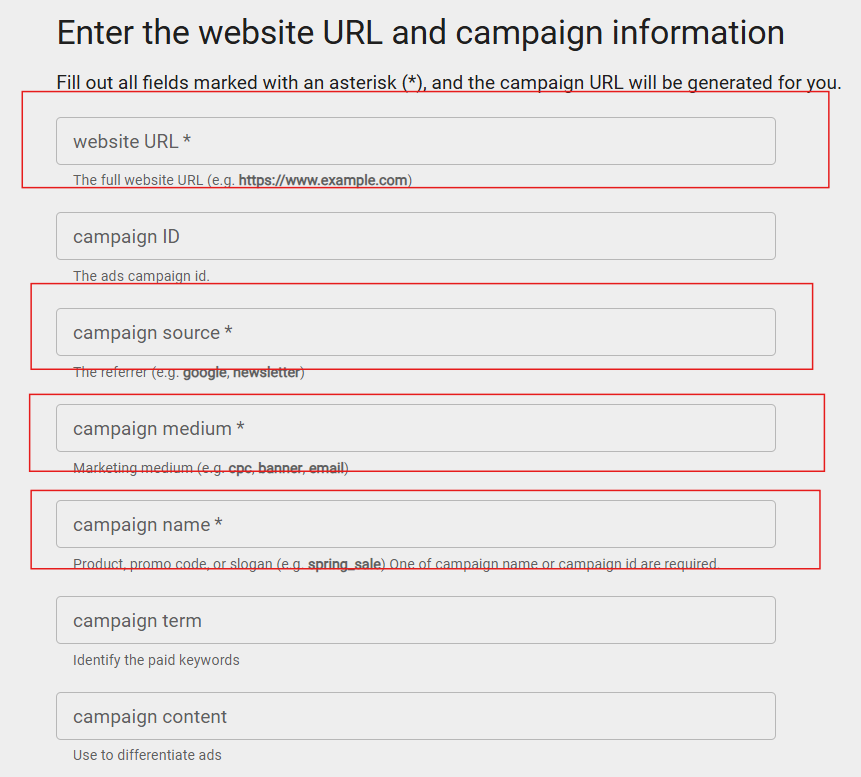
On the UTM settings page, the following four items are mandatory:
Website URL (Required)
- The URL whose traffic you want to track. This is usually a specific product page or event page. Just fill in the final page the user will land on.
Campaign_Source (Required)
- A parameter used to identify the traffic source, letting you know if the user came from Google, Facebook, YouTube, Website, or LinkedIn.
For example: campaign_source=facebook
Campaign_Medium (Required)
- A parameter used to categorize channels and communication formats. The most common ones might be CPC (cost-per-click) ads, Email, SNS (social networking sites), etc.
For example: campaign_medium=cpc
Campaign Name (Required)
- The name of the advertising campaign, usually named according to the product, campaign period, a KOL’s code, etc., to help you understand the content of this traffic source.
For example: campaign_name = 2024_product01
Campaign Term & Campaign Content are optional. If you want to understand the performance of different ad creatives in more detail, you can use these two parameters to facilitate your comparison.
2. Set UTM codes: Categorize codes for your traffic sources
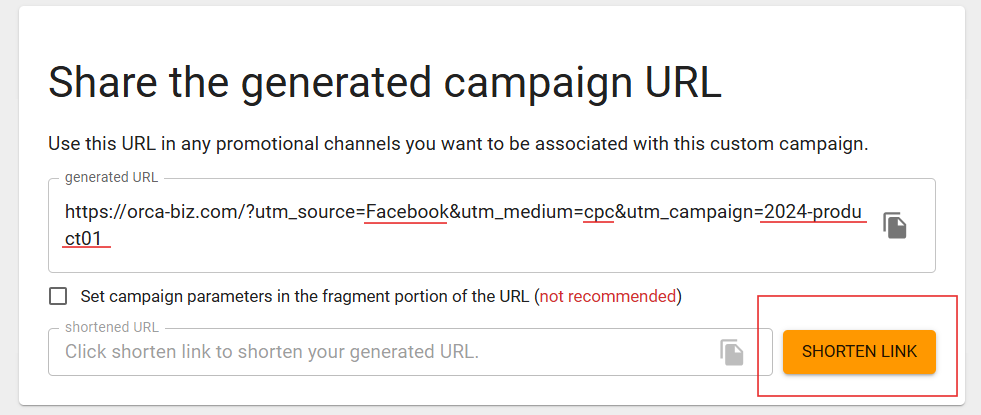
Example: Ad source (Facebook) / Ad medium (cpc) + Campaign (OO product) = Performance overview of OO product in Facebook cpc ads
Fill in the required fields as above, and you will get a set of UTM codes. If you think the URL is too long, you can use a URL shortener to make it look more concise and aesthetically pleasing.
3. Test that the URL click is normal
Open the URL containing UTM parameters in a browser to ensure the URL is correct. You can decide whether to shorten the URL again as needed.
👉 Bonus:Chrome UTM Extension, making UTM setup fast, intuitive, and more efficient!
Three things to note when using UTM
- UTM parameters must be consistent in case
When setting UTM parameters, pay attention to case sensitivity for easier management. If the case is inconsistent, or if parameters with inconsistent specifications such as underscores (_) are added, they will be treated as independent parameters in GA, and traffic will be calculated separately, leading to inconsistent data.Therefore, it is recommended to plan the format from the beginning, which will help with subsequent management. - Create a Master UTM Parameter Table
Being constantly busy with various campaigns and product materials, UTMs need to be managed to facilitate subsequent performance analysis.Set up a master UTM parameter table in advance, so you don’t have to bother organizing various UTM parameters, don’t need to think extra, and work more efficiently. - UTM parameters should be code-based; it is not recommended to include detailed personal information.
Since after setting UTM parameters, clicking on the corresponding UTM or short URL will display the complete URL containing the UTM parameters,therefore, it is not recommended to include more confidential details such as personal information or collaboration notes within the UTM parameters.Additionally, it is recommended that UTM parameters not be too long, to avoid consumer doubts, and a long URL when sharing will also somewhat affect the perception.
IV. How to view UTM in GA4?
The method to view UTM parameters in GA4 is as follows:
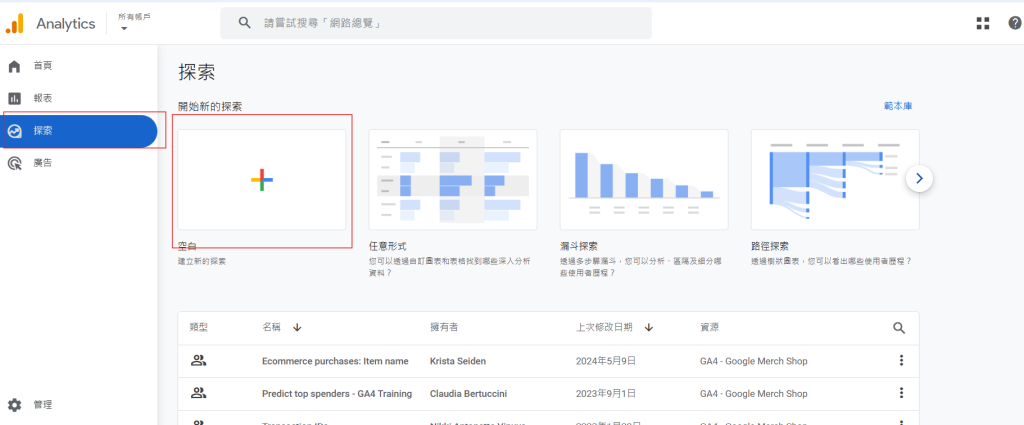
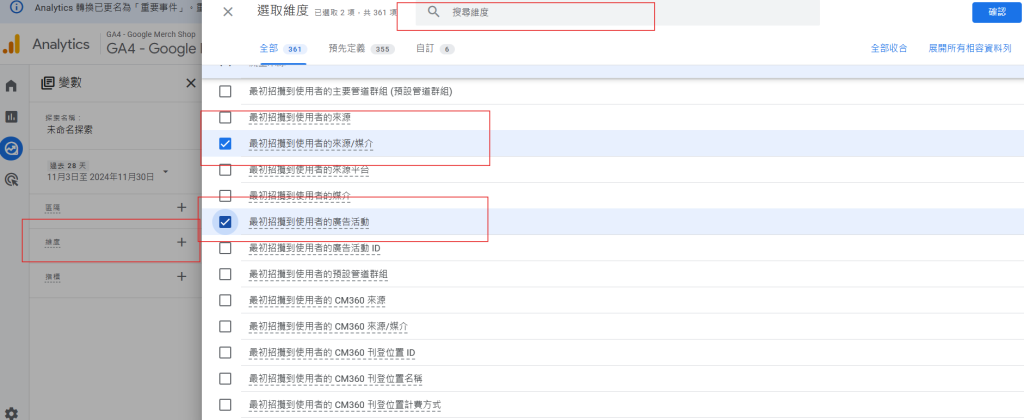
- Log in to your GA4 account: First, log in to your GA4 account and select the property for which you want to view UTM parameters.
- Go to “Explore”: Click “Explore” in the left sidebar to enter the custom reports page. Here, you can create custom reports to view UTM parameter data.
- Create a custom report: Click “Blank” to start creating a new exploration report. In the report settings, you can select different dimensions and metrics to view UTM parameters.
- Select “Source/Medium” dimension: In the exploration report, drag and drop “Source/Medium” or other relevant dimensions (e.g., “Campaign”, “Content”) into the row dimensions field. These dimensions are directly related to UTM parameters.
- Set metrics: You can select appropriate metrics to view data such as user count, conversion rate, events, sessions, etc. These metrics will show traffic and activity related to UTM parameters.
- View data: After completing the report setup, you can view the relevant data for UTM parameters. This allows you to understand traffic and performance from different sources, mediums, and campaigns.
Tip: To further segment, you can select specific UTM parameters (e.g., “utm_source”, “utm_medium”, or “utm_campaign”) as dimensions for viewing.
This allows you to easily view and analyze traffic sources from different UTM parameters in GA4, providing a more precise understanding of marketing campaign effectiveness.
Conclusion
Has the above content helped you better understand the operating principles, basic structure, and applicable scenarios of UTM?
In fact, by properly using UTM tools, the setup process becomes simpler, and performance can be easily monitored, eliminating the tedious dimension settings and data searches in the GA interface, making statistics faster and more efficient.
We hope today’s tutorial helps you improve your work efficiency and makes using UTM more convenient!
Recommended References:
Frequently Asked Questions
What is UTM?
UTM (Urchin Tracking Module) is a set of parameters added to the end of a URL to help Google Analytics (GA4) distinguish traffic sources and marketing campaign performance. It can tag information such as Source, Medium, and Campaign Name, letting you know where users clicked from.
In what scenarios can UTM be used?
UTM can be applied in various marketing scenarios: 1) Collaborating with KOLs to track the traffic each brings; 2) A/B testing different ads or landing pages; 3) Offline marketing activities (e.g., QR code flyers) to precisely measure effectiveness.
What are the UTM parameters?
There are four required parameters: 1) Website URL (the URL of the page to be tracked), 2) Campaign Source (e.g., facebook, google), 3) Campaign Medium (e.g., cpc, email), 4) Campaign Name. Optional parameters include Campaign Term and Campaign Content, which can be used for more detailed material tracking.
What are the steps to set up UTM?
The setup process is: 1) Go to the Google Campaign URL Builder tool; 2) Enter the URL and required parameters; 3) Generate the UTM code and test if the link opens correctly; 4) Use a URL shortener tool as needed to make the URL more concise.
What should I pay attention to when using UTM?
Pay attention to three points: 1) UTM parameters must be consistent in case sensitivity to avoid data fragmentation; 2) Create a master list of UTM parameters for unified management; 3) Do not include personal data or overly long information in the parameters to avoid affecting user experience or raising data security concerns.
How to view UTM data in GA4?
To view UTM in GA4: 1) Log in to your GA4 account; 2) Go to “Explore” to create a custom report; 3) Add “Source/Medium” or “Campaign” as dimensions; 4) Combine with metrics such as user count and conversion rate to analyze the traffic and performance of different UTMs.