
Sitemap What is it?
Sitemap Simply put, it’s a summary of your website’s content and structure, allowing the Google search engine to crawl your site more efficiently.The most common form of a sitemap is an XML sitemap. XML is primarily used to tell search engines about the page structure of a website, helping them to index website content faster. XML files can usually be generated automatically using tools.
Common Sitemap Types
In addition to Sitemaps that record basic website information,Sitemaps also include images, videos, and news.Websites of different natures will have different proportions of Sitemaps.
Image Sitemap
Image Sitemapis used to tell search engines about the structure and information of website images, especially for e-commerce websites with a large number of product images. By making good use of image Sitemaps, your website’s images have a higher chance of appearing in search engine results, thereby increasing exposure in image searches.
- Function: Provides the URL, description, and title of the image, allowing search engines to correctly crawl and display image content.
- Format: XML format, but specifically for image indexing.
- Applicable to: Websites with a large number of images, such as e-commerce websites, photography portfolio websites, etc.
Video Sitemap
A video sitemap is used to help search engines understand the structure of video content on a website. Video sitemaps are also very important for websites with a lot of video content. Video sitemaps are more complex than image sitemaps and require marking the duration, video category, and age rating in the code.It is recommended to have a professional engineer assist with this.
- Function: Provides detailed information about videos, such as title, description, playback time, URL, etc., to help search engines better index video content.
- Format: Also uses XML format, specifically designed for video content.
- Applicable to: Websites with a large amount of video content, such as news websites, learning websites, etc.
News Sitemap
A news sitemap can be said to be a sitemap specifically generated for news-type websites. Unlike other sitemaps, Google News reports must be removed from the sitemap more than two days after publication, or the <news:news>metadatamust be removed from old URLs. This may be to allow Google to quickly understand which pages contain the latest information and to crawl more efficiently. In thissituation where sitemaps need to be updated quickly,, professional team assistance is often required.。
If readers need to use the above three types of Sitemaps, it is recommended to check the filling format and required fields in Google’s official instructions to more effectively help the sitemap be included!
Can SEO rankings be improved by creating a Sitemap?
Google officialonce explainedSitemaps do not directly affect SEO rankings. However, we still need to submit a Sitemap to help crawlers index our website faster and allow Google to understand the website content more quickly. It can be said to bean “indirect factor” affecting SEO performance。
From a crawler’s perspective, having a Sitemap as a “lazy pack” can speed up crawling efficiency. Therefore, a good Sitemap can be said to be an important tool for communicating with crawlers. If you want to do well in website SEO, a Sitemap is an indispensable step.
Does every website need a Sitemap?
Is a Sitemap essential for every website? Not necessarily!Google Official documentationlists three types of websites that “are recommended” to have a sitemap:
- Very large websites:Generally, large websites have more “orphan pages” that are difficult for Google’s crawlers to crawl one by one. It is recommended to create a sitemap to help crawlers understand the website structure.
- New websites:A new website is like a transfer student who just joined a class. A sitemap can help crawlers get to know your new website faster.
- Your website contains many videos, images, or news:As mentioned earlier, video sitemaps, image sitemaps, or news sitemaps will mark additional information about videos, images, or news to help these media be found.
Sitemap Creation Tutorial
Now that you understand the importance of sitemaps, let’s create your website sitemap together. There are various tools online that can help you quickly generate an XML sitemap. You don’t need to know how to code to easily complete it, and it’s completely free!
1. Use a Sitemap Generator Tool
The easiest way to create a sitemap is touse a sitemap generator. We recommend the XML Sitemap tool:
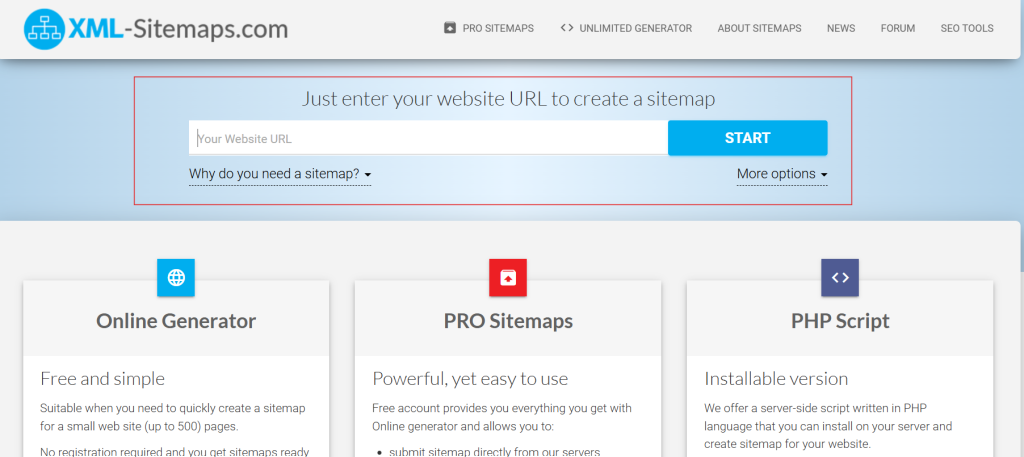
You just need to enter your website URL in the red box, click “start” on the right, wait a moment, and then click “download” to generate your sitemap!
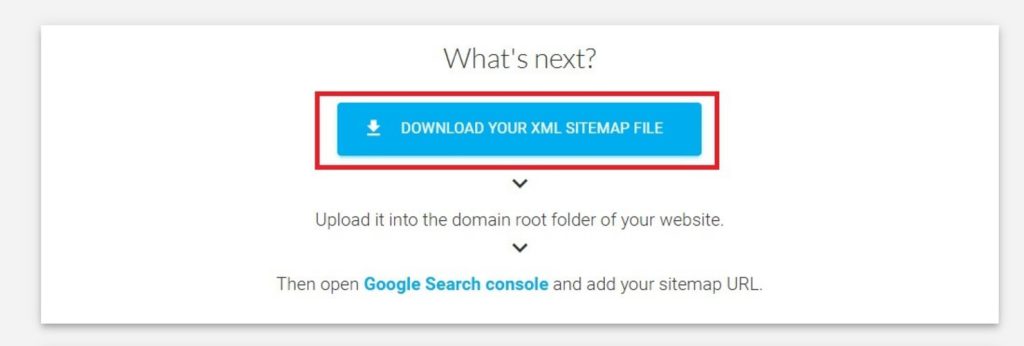
This tool’s free trial can only crawl 500 URLs, making it more suitable for small websites. If your website is medium to large and frequently updated, we recommend considering a paid plan that allows the tool to update daily. This is a very convenient feature for websites that require regular maintenance and updates.
2. Manually create a sitemap
If you are good at coding, you can also manually write XML files. For detailed Sitemap writing specifications, you can refer tositemap orgthis website.
3. Use a WordPress Plugin to Generate a Sitemap
If you are usingWordPressto build your website, plugins likeYoast SEOandRankMathboth offer free Sitemap generation features. These plugins allow you to easily create and submit Sitemaps for your website, thereby helping search engines index your website content more effectively.
Using RankMath to Generate a Sitemap
Taking theRankMathplugin as an example, after installation and activation, you can find the Sitemap settings option in the settings area. As long as your WordPress website is functioning normally, RankMath will automatically generate and update the Sitemap for your website.
The specific steps are as follows (you can follow the video to try it out)
- Install and activateRankMathplugin.
- Log in to your WordPress backend and selectRankMath > Sitemap Settings。
- On this page, you can enable or disable various page types (such as posts, pages, categories, etc.) from being included in the Sitemap, as needed.
- Click “Save Changes,” and RankMath will automatically generate a Sitemap for your website.
You can view your Sitemap using the following URL (e.g.,https://www.yoursite.com/sitemap_index.xml), and submit it to search engines as needed to ensure your website is properly indexed.
How to Submit a Sitemap
Once we’ve finally created the Sitemap, we’re on the last leg of the journey. Don’t forget to submit it, so your efforts aren’t in vain!
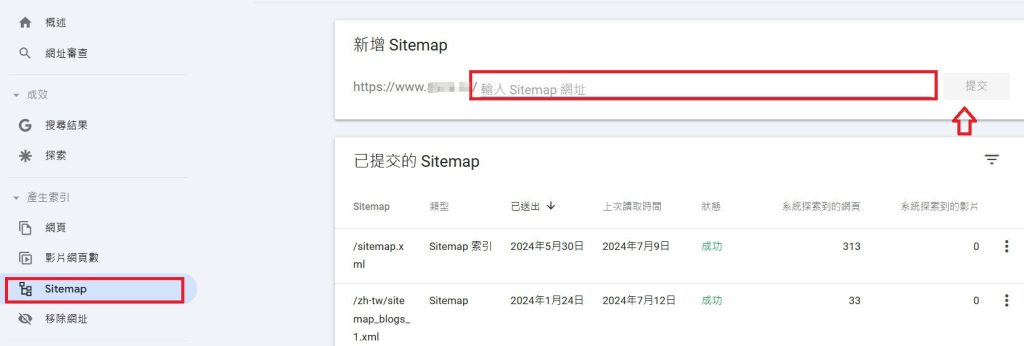
- Log in toGoogle Search Console。
- Select “Sitemaps” from the left-hand menu.
- Enter the URL path of your sitemap (e.g.,
https://www.example.com/sitemap.xml) and submit.
Sitemap Upload Limits
According to official Google documentation, a single Sitemap has a maximum size of 50 MB when uncompressed and can contain a maximum of 50,000 URLs. If these limits are exceeded, the Sitemap needs to be split and uploaded in batches.
Another submission method is “placing it in the root directory,” which is typically used for websites not built with WordPress, or large websites with multiple sitemaps. These types of websites are usually handled by professional outsourcing vendors. It is recommended that those with similar needs consult an expert.
How often is a sitemap updated?
For websites built with WordPress and having the Yoast or RankMath plugin installed, if the Sitemap is correctly set up in both the plugin and Google Search Console, it willautomatically update regularly. In addition, if there are major changes to the website, such as redirects, mass deletion of pages, or a large amount of new content, it is recommended to resubmit the Sitemap to allow crawlers to quickly understand what content has been updated on your website.
Summary
A Sitemap is a helpful assistant for website structure and content, helping search engines quickly understand the page structure of a website. For those who need frequent updates, have large websites, or prioritize SEO, regular Sitemap updates are very important! Sitemaps help you easily increase organic traffic and let more people see your website!
Frequently Asked Questions
What is a Sitemap?
A Sitemap is an XML document that helps search engines understand the structure of a website, allowing search engines like Google to crawl and index website content more efficiently. It can speed up the inclusion of new content.
What are the types of Sitemaps?
Common Sitemap types include: 1) XML Sitemap (basic website map); 2) Image Sitemap (improves image inclusion rate, suitable for e-commerce or photography websites); 3) Video Sitemap (provides video title, description, and playback information); 4) News Sitemap (suitable for news websites, requires rapid updates).
Does having a Sitemap directly improve SEO ranking?
A Sitemap does not directly affect SEO ranking, but it helps Google crawlers index the website faster and more completely, indirectly improving the website’s visibility in search results.
Which websites are strongly recommended to have a Sitemap?
Google officially recommends Sitemaps for the following types of websites: 1) Large websites (many pages, prone to orphan pages); 2) New websites (helps crawlers quickly recognize new sites); 3) Image, video, or news websites (tag more information through dedicated Sitemaps).
How do I create a Sitemap?
There are three common ways to create a Sitemap: 1) Use an online Sitemap generator tool (such as XML Sitemap Generator); 2) Manually write an XML document; 3) Automatically generate using WordPress plugins (such as Yoast SEO, RankMath).
How do I submit a Sitemap to Google?
You can submit a Sitemap via Google Search Console: After logging in, go to the “Sitemaps” feature, enter the Sitemap URL (e.g., https://www.example.com/sitemap.xml), and submit. You can also place sitemap.xml in the website’s root directory.
How often should I update my Sitemap?
If you use WordPress with the Yoast or RankMath plugins, your Sitemap will update automatically. If there are significant changes to your website (such as redirects, mass deletion, or addition of pages), it is recommended to manually submit your Sitemap to ensure that crawlers quickly understand the latest status of your website.