
When you search for a brand name in Google, have you noticed that some results show extra links underneath the main listing? Those extra links are called sitelinks. They help users find what they need faster and can significantly improve click-through rate (CTR).
Google does not give sitelinks to every site. So how do you optimize SEO to increase your chances? In this article, we will explain how sitelinks work and what you can do to make your website more likely to earn them.
What Are SEO Sitelinks?
When you search for a brand or website name, you may see extra internal links below the main result, such as About Us, Product Pages, or Contact Us. These are called SEO sitelinks, and Google generates them automatically to help users reach the most relevant pages faster and improve the search experience.
According to Google’s official documentation, sitelinks are the links shown under a single web result for the same domain. Google’s systems analyze your site’s link structure and look for shortcuts that save users time.
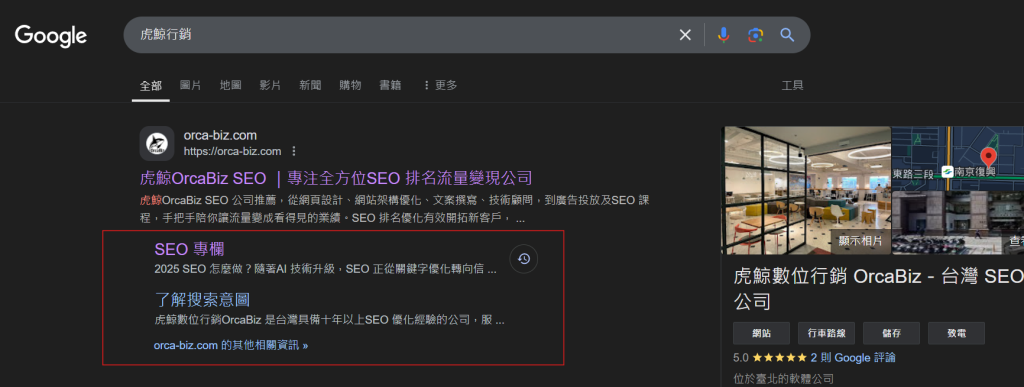
For example, when someone searches for OrcaBiz, they may see links such as SEO articles, search intent guides, or contact pages below the main result. Sitelinks save users time by taking them directly to the page they want instead of making them click the homepage first and browse around.
Besides improving user experience, sitelinks are also good for SEO. They increase CTR because the result takes up more space on the page, making your site more visible. They also signal that your site architecture is clear, which can improve overall authority and ranking stability.

What Are the Benefits of SEO Sitelinks?
- Higher CTR: Sitelinks take up more search result space and draw user attention.
- More traffic: They send visitors directly to important pages such as product pages, contact pages, or FAQs.
- Stronger brand authority and trust: Only clear, authoritative sites tend to earn sitelinks.
- Better SEO: Sitelinks show that Google understands your site structure and values your content.
- Reduced competitor visibility: More space in search results means less room for competitors.
How Does Google Decide Which Sitelinks Show?
Sitelinks are not something you set manually. Google chooses them automatically based on your site structure, user behavior, and search performance. If Google thinks a result is useful, it may show sitelinks. If your structure is unclear or the links are not relevant, it may not show them.
That means not every site gets sitelinks. Factors such as site architecture, internal linking, and user behavior all matter. If you want sitelinks, you need to understand how they work and optimize your site in the right way.
How to Optimize Your Site for Sitelinks
Although sitelinks cannot be manually assigned, you can improve your chances by strengthening your site structure and content architecture. Here are five optimization directions.
1. Build a clear site structure

Google prefers sites with clear navigation and distinct categories. If your site has good navigation and strong internal linking, Google can understand your hierarchy and identify your most important pages more easily.
For example, if your homepage has clear menu items such as Products, Services, and Contact Us, those pages have a better chance of being selected as sitelinks.
2. Strengthen important pages with internal links
Internal linking is one of the main factors that influences sitelinks. Google uses your internal link structure to judge which pages matter most. If you want a page to appear in sitelinks, make sure it receives plenty of internal links.
For example, if your best-selling product page is linked frequently across the site, Google is more likely to treat it as an important page and show it as a sitelink.
3. Improve user behavior and CTR
Google analyzes search behavior to judge which pages are most valuable. If many users search your brand and then click pages like FAQ or Login, Google may see those pages as important. In other words, the more users interact with a page, the more likely it is to become a sitelink.
That is why page naming matters. If visitors can instantly recognize the page they need and keep interacting with it, that page has a better chance of being promoted into sitelinks.

4. Increase brand searches
Sites with sitelinks usually appear in the number one position for branded searches. That is why brand building matters. If your brand gets more searches and Google sees that your site is trusted, your chances of earning sitelinks rise significantly.
5. Use Google Search Console to guide improvements
You cannot manually choose sitelinks, but you can influence them through Google Search Console and your site structure. If Google chooses an unsuitable page, you can adjust your site hierarchy, reduce the importance of that page, or use robots.txt to block crawling of the page, indirectly affecting sitelink selection.
Conclusion: Why SEO Sitelinks Matter
Sitelinks are more than just extra exposure. They improve SEO performance and user experience at the same time. Although Google selects them automatically, you can raise your chances by improving site structure, internal linking, and brand search volume. If your site does not have sitelinks yet, now is the right time to optimize so your search presence becomes stronger and your traffic and conversions grow.